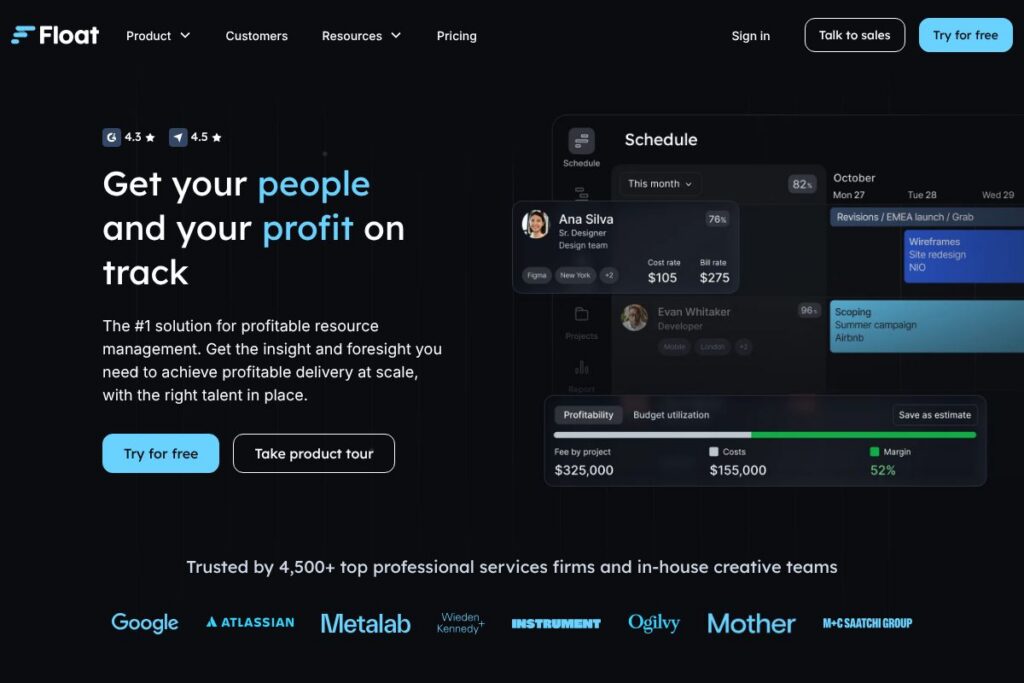

Float: An Overview
Float is a specialist resource management and scheduling tool designed for professional services and delivery teams that need clear capacity planning and utilization tracking. The platform focuses on mapping people to projects, forecasting demand, and providing a single source of truth for who is available and when.
Compared with Resource Guru, Float places more emphasis on forecasting and utilization analytics rather than simple booking calendars. Relative to 10,000ft, Float aims for a balance between visual scheduling and financial forecasting without the heavier project portfolio features. Compared with monday.com, Float is narrower in scope and more specialized on resource planning, while monday.com provides broader project and work management capabilities.
All of this makes Float well suited to agencies, consultancies, and internal professional services teams that need accurate capacity planning, people-first scheduling, and clearer visibility into utilization and forecasted profitability.
How Float Works
Float keeps a central schedule of people and projects, pulling or pushing data to connected systems to keep availability and project dates accurate. Users create projects and assign people to tasks or project blocks on a calendar-like interface, and the system calculates utilization and capacity automatically.
Teams use Float to run scenario planning by adjusting allocations and seeing the downstream impact on capacity and billable utilization. Syncing with calendars and time-tracking tools lets managers compare scheduled work with actual logged hours to tighten forecasting and staffing decisions.
Float features
Float’s core capabilities center on visual scheduling, capacity forecasting, integrations, and reporting that connect people, projects, and financial systems. The product also highlights security compliance and modern APIs to keep schedules aligned across tools, with recent emphasis on formalized compliance and B Corp certification.
Scheduling and Planning
The main scheduling view is a timeline calendar where you assign people to projects or tasks and see day-by-day availability. This visual approach reduces overbooking and makes it easy to move people between projects while preserving continuity and delivery timelines.
Capacity Planning and Utilization
Float calculates utilization rates based on assignments and working hours, so managers can spot underused or overbooked team members. Those metrics feed into hiring and bench decisions, helping teams maintain profitable delivery levels.
Forecasting and Scenario Modeling
You can run what-if scenarios by shifting assignments or adjusting project dates to project future utilization and staffing gaps. Scenario modeling helps inform hiring, subcontracting, or reprioritizing projects before resource bottlenecks occur.
Integrations and Data Sync
Float integrates with calendars, time trackers, and project tools to keep schedules in sync with real work and financial systems. Linking with external systems reduces manual updates and ensures capacity and financial forecasts use current data; see Float’s integrations for details on supported connections.
Time Tracking and Timesheets
Float supports time entry and timesheet review, allowing teams to reconcile scheduled allocations with actual hours worked. That linkage helps improve forecast accuracy and supports client billing or internal chargeback processes.
Reporting and Insights
Built-in reports show utilization, bench time, and role-level allocations to highlight trends and pipeline risk. These insights are useful for weekly staffing meetings and quarterly capacity planning sessions.
Compliance and Security
Float maintains GDPR and SOC 2 alignment and communicates security controls appropriate for professional services teams. The company also highlights its B Corp certification as part of its governance and impact commitments.
With these features, Float provides teams with the visibility and forecasting needed to balance people, projects, and profit while keeping schedules connected to the rest of the stack.
Float pricing
Float uses a subscription SaaS pricing model and offers a free 30-day trial; detailed plan rates are not published on a dedicated pricing page. For current plan options, seat-based details, and enterprise arrangements, see Float’s pricing and plans on their site.
What is Float Used For?
Float is commonly used to plan and visualize team schedules, manage capacity across multiple projects, and track utilization by role or individual. It helps teams make people-first resourcing choices while keeping an eye on billable capacity and forecasted delivery.
Agencies and consultancies use Float to align staff to client work and prevent overcommitment, while in-house delivery teams use it to balance internal projects and support functions without overloading key specialists. The tool is also useful during hiring planning and when evaluating whether to hire, bench, or subcontract work.
Pros and cons of Float
Pros
- Clear visual scheduling: The calendar-style timeline makes it easy to see assignments and availability at a glance, reducing double-booking and scheduling errors.
- Forecasting-focused: Built-in scenario modeling and utilization metrics help teams plan hiring and delivery with financial impact in mind.
- Integrations-first approach: Integrations with calendars, time trackers, and project tools reduce manual updates and keep data consistent across systems.
- Security and governance: GDPR and SOC 2 compliance plus B Corp certification provide confidence for teams with regulatory or impact requirements.
Cons
- Focused scope: Float concentrates on resource planning and scheduling, so teams needing broader project management feature sets may need complementary tools.
- Enterprise customization: Large organizations with complex billing or resource workflows may require custom integrations or services which can add implementation overhead.
- Pricing visibility: Detailed pricing tiers and enterprise quotes are not published on a single public pricing page, making initial cost comparisons harder without contacting sales.
Does Float Offer a Free Trial?
Float offers a free 30-day trial. The trial gives teams a hands-on way to import or create schedules, try integrations, and evaluate capacity planning and forecasting features before committing to a paid subscription; start the trial from Float’s sign-up and onboarding flow.
Float API and Integrations
Float provides a variety of integrations with calendar and time-tracking tools and exposes API endpoints for syncing schedules programmatically. The Float integrations listing outlines supported connections and common workflows for keeping rosters and project dates aligned.
Key integrations include connections to Google Calendar, Outlook, Slack, Jira, and time trackers like Harvest; teams can combine these integrations to automate schedule updates and reporting. For developer work, consult the Float API documentation to see available endpoints and authentication details.
10 Float alternatives
Paid alternatives to Float
- Resource Guru — Simple resource scheduling focused on quick booking and calendar-based availability tracking for small to mid-size teams.
- Forecast — Resource and project forecasting with built-in time tracking and AI-assisted planning for agencies and consultancies.
- 10,000ft — High-level planning and staffing for portfolios of projects with visual capacity overlays and scenario planning.
- monday.com — Broad work and project management platform with resource management templates and flexible automations.
- Smartsheet — Spreadsheet-style work management that can be configured for resource planning and capacity tracking at scale.
- Workday Adaptive Planning — Enterprise-grade planning and forecasting that includes workforce modeling and financial integration.
- Tempo Timesheets — Resource planning and time tracking built for teams using Jira as their central work hub.
Open source alternatives to Float
- OpenProject — Open source project management with resource planning modules and configurable workflows for teams that self-host.
- ERPNext — Open source ERP that includes employee and project modules which can be adapted to basic resource planning needs.
- Taiga — Agile project management platform with extensions and plugins that can be used for simple capacity and sprint-level planning.
Frequently asked questions about Float
What is Float used for?
Float is used for resource scheduling, capacity planning, and utilization tracking for professional services teams. Teams use it to assign people to projects, forecast demand, and make staffing decisions.
Does Float integrate with calendar and time-tracking tools?
Yes, Float connects to common calendars and time trackers. Typical integrations include Google Calendar, Outlook, Slack, Jira, and Harvest to keep schedules and time entries in sync.
How much does Float cost?
Float uses subscription pricing and provides a free 30-day trial, with detailed plan rates available by contacting the company or viewing their plan information. For exact seat pricing and enterprise options, check Float’s pricing and plans.
Can Float handle enterprise security requirements?
Float supports GDPR and SOC 2 compliance and publishes security practices relevant to enterprise customers. Larger organizations can review security controls and request information about data handling and contracts.
Is Float suitable for small teams?
Float works for small teams as well as mid-size agencies and in-house delivery teams. Its visual scheduling and utilization tracking scale down to smaller rosters while still providing the forecasting benefits used by larger teams.
Final Verdict: Float
Float excels at giving teams a clear, visual view of who is working on what and when, with forecasting and utilization metrics that support profit-minded resourcing decisions. Its focus on capacity planning, integrations, and security makes it a practical choice for agencies and professional services teams that need accurate scheduling without adding full project management complexity.
Compared with Resource Guru, Float emphasizes forecasting and utilization analytics and positions itself for teams that need deeper scenario modeling. In terms of pricing, Resource Guru publishes transparent per-seat plans while Float uses a subscription model with a free 30-day trial and enterprise options that are detailed through their sales or plan pages; review Float’s pricing and plans for specifics and to compare features directly.