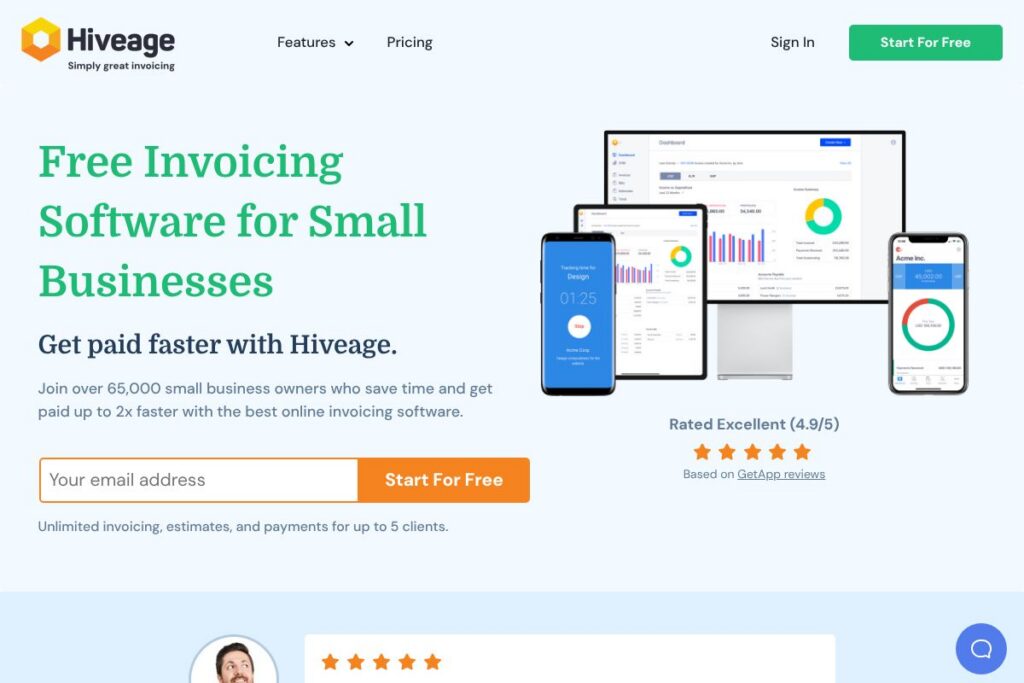

What is Hiveage
Hiveage is a cloud-based invoicing and billing platform designed for freelancers, small businesses, and agencies that need a focused billing tool rather than full accounting software. It provides invoice and estimate creation, recurring and subscription billing, payment collection through multiple gateways, time and expense tracking, and multi-currency support in a web and mobile interface.
Compared with full accounting suites like QuickBooks Online and Xero, Hiveage concentrates on billing workflows and payment collection without the broader accounting complexity. Against lightweight alternatives such as FreshBooks and Wave, Hiveage places more emphasis on flexible recurring billing and client-level controls while offering a free tier suitable for very small operations.
What Hiveage does particularly well is simplify the invoicing lifecycle for users who want fast setup, clear invoice presentation, and reliable payment integrations. It is best suited for solo freelancers, consultants, small agencies, and businesses that need recurring billing and time-to-invoice efficiency without a steep learning curve.
How Hiveage Works
Hiveage runs entirely in the browser and through native iOS and Android apps, so you create and send invoices from any web-enabled device. Users add clients, items, taxes, and payment terms, then send invoices by email, SMS, or shareable link; invoices can include saved payment methods to speed repeat billing.
Recurring or subscription invoices are configured with frequency and auto-billing options, and estimates can be converted into invoices after client approval. Time entries, expenses, and mileage are logged against clients or projects and converted to billable items, which streamlines the common freelancer workflow of track-to-bill.
Automated notifications and payment reminders reduce follow-up work, and the dashboard surfaces due invoices, recent payments, and aging summaries so businesses can monitor cash flow in one place. Integrations with payment gateways process card payments, while CSV export and API access support data portability and automation.
What does Hiveage do?
Hiveage centers on billing, payments, and simple financial reporting, with core features built to speed invoicing and reduce manual bookkeeping. Recent focus areas include improved mobile invoicing, expanded gateway options, and more flexible recurring billing controls.
Invoice Customization
You can add your logo, business details, custom colors, and reusable templates so each invoice matches your brand. Tax calculations, discounts, shipping, and multi-currency formatting are handled automatically, which reduces manual errors and speeds client approvals.
Payment Processing
Hiveage connects to a range of online payment gateways so clients can pay by credit or debit card, and it supports partial or offline payments. Saved card-on-file options simplify recurring charges and re-billing for retained clients.
Recurring and Subscription Billing
Set up automated recurring invoices with manual, automatic, or auto-billing modes and choose billing intervals from daily to yearly. The system allows switching between automatic and manual billing for greater control over subscription workflows.
Estimates and Quotes
Create professional estimates that clients can approve online, then convert approved estimates into invoices with one action. You can set expiry dates for estimates and send reminders to encourage timely acceptance.
Time, Expense, and Mileage Tracking
Log billable hours, project expenses, and trip mileage inside the same account and attach receipts or supporting files. Entries can be converted to invoice line items, enabling accurate billing for project-based work.
Reporting and Analytics
Real-time reports cover income and expenses, invoice details, accounts aging, and payment history to reduce manual bookkeeping. The dashboard offers quick insights and you can export CSV data or use the API for custom reports.
Multi-Currency and Tax Management
Bill clients in their preferred currency with locale-aware formatting and apply multiple taxes, discounts, and shipping fees with precise calculation controls. These features help businesses that serve international clients maintain correct invoicing formats.
Mobile Apps and Accessibility
Native iOS and Android apps let you create invoices, log time, and accept payments on the go, while the web app provides full access from desktop browsers. Notifications and mobile-friendly invoice layouts make it practical to manage billing away from the office.
Data Import, Export, and Backup
Import client lists and invoice records via CSV and export reports for accounting or archival purposes; Hiveage also supports API-based access for automated data flows. The platform maintains redundant storage and backups to protect your billing data.
With these capabilities, Hiveage focuses on making billing fast and repeatable, reducing time between service delivery and payment, and keeping invoicing workflows centralized and easy to manage.
Hiveage pricing
Hiveage uses a freemium subscription model with a free plan for very small businesses and paid tiers that unlock advanced billing, team access, and reporting. Public price points are not presented in the source content here, but the platform offers monthly and annual billing options and an enterprise approach for larger organizations.
Monthly Billing:
Free (Starter): Manage up to 5 clients with unlimited invoices, estimates, time tracking, expense tracking, and access to payment gateways.
Pro: Adds more clients, team member access, recurring billing controls, and enhanced reporting for growing businesses.
Plus / Business: Includes multi-business management, custom domains, branded email notifications, automatic payment reminders, and priority support for agencies and larger teams.
Annual Billing:
Free (Starter): Same features as monthly free tier, suitable for single-person operations or trial use.
Pro: Annual billing typically reduces the effective monthly cost for small teams and includes the same feature set as monthly Pro with potential savings.
Enterprise / Custom: Custom pricing and contracts for large businesses that require SSO, dedicated onboarding, or data migration assistance.
For the most up-to-date plan details and any published rates, view the current pricing options on the vendor site or contact their sales team for an enterprise quote.
What is Hiveage Used For?
Hiveage is commonly used to send professional invoices and quotes, collect online payments, and manage recurring subscriptions for service-based businesses. Freelancers, consultants, agencies, and small product sellers use it to centralize client billing, automate reminders, and reduce administrative time spent chasing payments.
It is also used to track billable time, expenses, and mileage so those entries become invoiceable items with minimal manual work. Agencies and small teams use role-based access to share invoicing tasks while keeping client-facing documents branded and consistent.
Pros and cons of Hiveage
Pros
- Simple, focused invoicing: The interface is designed for quick invoice creation and recurring billing without the overhead of full accounting software, making onboarding fast.
- Free plan for very small businesses: The free tier supports unlimited invoices for a limited number of clients, which is useful for sole proprietors and new freelancers.
- Flexible payment gateway support: Integrations with multiple gateways let businesses accept cards globally and save cards on file for repeat clients.
- Time and expense consolidation: Built-in time, expense, and mileage tracking lets you convert records into invoices without separate tools.
Cons
- Not a full accounting system: Hiveage focuses on billing and payments and does not replace full-featured accounting platforms for bookkeeping, payroll, or tax filing.
- Advanced features behind paid tiers: Team management, multi-business handling, custom domains, and some automation require a paid subscription.
- Limited native ecosystem compared to larger vendors: While it integrates with major gateways and offers an API, Hiveage has fewer built-in third-party app connectors than larger accounting platforms.
Does Hiveage Offer a Free Trial?
Hiveage offers a free plan and a 14-day free trial of Pro that unlocks advanced features such as more clients, team member access, recurring billing options, detailed financial reports, branded notifications, and automatic payment reminders; after the trial you can continue on the free plan or move to a paid tier.
Hiveage API and Integrations
Hiveage provides a developer API for programmatic access to clients, invoices, payments, and reports; refer to the Hiveage API documentation for endpoints and usage examples. The API supports automation, data export, and integration with back-office systems.
The platform integrates with popular payment gateways including Stripe, PayPal, Square, and Braintree, and can be connected to other apps through automation platforms such as Zapier to extend workflows and sync client or invoice data.
10 Hiveage alternatives
Paid alternatives to Hiveage
- FreshBooks — Cloud invoicing and simple accounting that combines time tracking, expense capture, and estimates with client-friendly invoices.
- QuickBooks Online — Broad accounting suite with invoicing, payroll, tax features, and deep bookkeeping capabilities for scaling small businesses.
- Xero — Full accounting platform with invoicing, bank reconciliation, and payroll integrations aimed at small and medium businesses.
- Wave — Free accounting and invoicing for small businesses with optional paid payment processing and payroll add-ons.
- Zoho Invoice — Affordable invoicing with automation, multi-currency billing, and tight integration with the Zoho suite.
- Invoice2go — Mobile-first invoicing app geared toward contractors and solo service providers who invoice on the go.
- Square Invoices — Simple invoicing with built-in card processing and Square point-of-sale integration.
Open source alternatives to Hiveage
- Invoice Ninja — Open source invoicing, proposals, time tracking, and payment processing with self-hosting or hosted plans.
- Crater — Self-hosted invoicing and expense tracking that supports custom templates and multiple currencies.
- Dolibarr — Open source ERP/CRM with invoicing modules suited to small businesses that want broader business management.
- ERPNext — Full open source ERP with billing and accounting modules for businesses that prefer self-hosting and customization.
Frequently asked questions about Hiveage
What is Hiveage and who is it for?
Hiveage is an online invoicing and billing platform for freelancers, consultants, and small businesses. It focuses on invoice creation, recurring billing, time and expense tracking, and payment collection.
Does Hiveage have a free plan?
Yes, Hiveage offers a free plan. The free tier supports up to five clients with unlimited invoices, estimates, time tracking, and expense tracking, plus access to payment gateways.
Can Hiveage accept credit card payments?
Yes, Hiveage accepts credit card payments via multiple gateways. It supports gateways such as PayPal, Stripe, Square, and Braintree, and lets you save cards on file for re-billing.
Can I convert estimates to invoices in Hiveage?
Yes, Hiveage converts accepted estimates into invoices with one action. You can send estimates for online approval, set expiry dates, and then generate invoices from approved estimates.
Does Hiveage provide API access for integrations?
Yes, Hiveage provides an API for automation and data access. See the Hiveage API documentation for endpoints to manage clients, invoices, and payments programmatically.
Final verdict: Hiveage
Hiveage is a practical choice for freelancers and small businesses that need a straightforward, reliable invoicing platform with built-in payment processing, recurring billing, and time-and-expense capture. Its free tier and focused feature set make it easy to start invoicing quickly without adopting a full accounting suite.
Compared with a more comprehensive accounting provider like QuickBooks Online, Hiveage is narrower in scope but simpler to operate; QuickBooks Online bundles accounting and payroll features behind subscription plans, while Hiveage keeps billing workflows front and center and offers a free plan plus paid tiers for scaling teams. For businesses focused on fast invoicing and predictable subscription billing, Hiveage is a strong, purpose-built option.