
What is Upflow
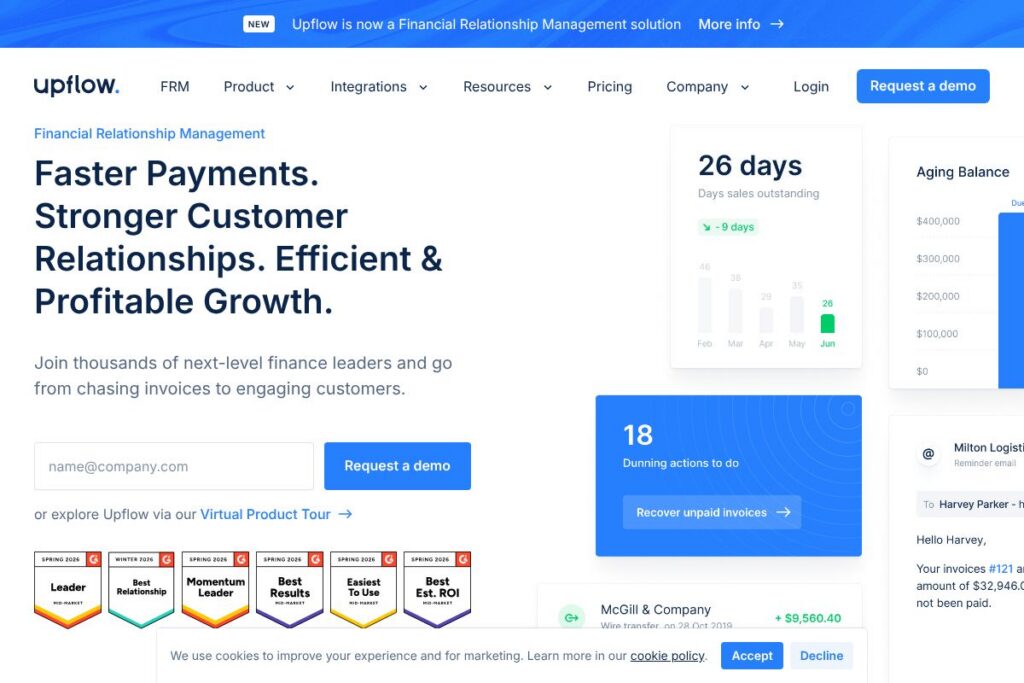
Upflow is an accounts receivable software platform built to help finance teams stop chasing invoices and recover overdue payments more efficiently. It centralizes receivables data, automates personalized reminder cadences, and exposes live cash flow metrics so teams can act on aging receivables and forecast cash with more confidence.
Compared with Bill.com, which focuses broadly on accounts payable and bill payments alongside AP automation, Upflow is specialized for collections and customer-facing AR workflows. Compared with Chaser, which automates reminders for small and midsize businesses, Upflow places more emphasis on unified cash dashboards and integrations with enterprise accounting systems. Against Stampli and HighRadius, Upflow aims to simplify collections for finance teams with a focus on customer collaboration and payment experience rather than deep invoice coding or advanced AP workflows.
Upflow does particularly well at turning receivables into predictable cash by combining automated outreach, payment options, and reconciliation tools in one place. That combination makes it a practical choice for finance teams at B2B companies that want to reduce DSO, improve customer relationships during collections, and gain clearer forecasting without replacing their accounting system. For an introduction to the product and capabilities, visit the official Upflow homepage.
How Upflow Works
Upflow connects to your accounting or invoicing system and imports outstanding invoices to create a single accounts receivable ledger. From there you configure reminder sequences, define payment options, and assign internal stakeholders to specific accounts so collections activity is coordinated and tracked in one place.
Once connected, Upflow surfaces live dashboards that show cash flow metrics such as days sales outstanding and forecasted cash, and it automates customer-facing actions: email reminders, self-serve payment links, and autopay options. Teams use the platform to run targeted collection campaigns, escalate overdue accounts collaboratively, and apply payments automatically to invoices when funds are received.
On a daily basis finance teams typically review the dashboard to prioritize aged customers, monitor open disputes, and let Upflow execute follow-up steps automatically, freeing staff to focus on exceptions and high-value accounts. The platform is designed to work alongside accounting tools so you keep your existing ledger while improving collections efficiency quickly.
What does Upflow do?
Upflow is organized around cash collection, receivables visibility, and customer payment experience. Core capabilities include automated personalized reminders, live cash flow dashboards, payment link support, and automatic cash application to invoices. The vendor continues to expand integration and payments options to shorten time to cash and reduce manual reconciliation work.
Key capabilities include:
Live dashboards and forecasting
Real-time dashboards show metrics such as open AR, days sales outstanding, and expected cash inflows. These visualizations help finance teams prioritize accounts, run scenario forecasting, and report cash positions to leadership without manual spreadsheet updates.
Automated personalized reminders
Automated sequences let you send tailored payment reminders that reflect invoice age, amount, and customer segment. Personalization and a cadence engine reduce the need for manual outreach and help recover unpaid invoices faster while maintaining good customer relationships.
Modern payment methods and self-service payment pages
Upflow provides customer-facing payment pages and supports multiple payment methods to reduce friction at invoice payment time. Offering diverse payment options and autopay increases the likelihood of on-time payment and improves the overall customer experience.
Automatic cash application
Payments received via integrated processors or payment links can be matched to invoices automatically, reducing reconciliation time and cutting down on manual bookkeeping. Automatic cash application accelerates month-end close by keeping the ledger in sync with bank receipts.
Collaboration and dispute management
The platform enables internal collaboration by assigning owners, tracking communications, and recording dispute notes on customer accounts. This keeps collections activity visible across finance, sales, and customer success teams and helps resolve billing problems faster.
Integrations with accounting and payments systems
Upflow connects to common accounting systems and payment providers so you can keep your existing invoicing stack. Integrations reduce duplicate data entry and make reconciliations smoother by syncing invoice and payment status back to your general ledger.
With these capabilities, the biggest benefit is improved cash flow visibility and reduced manual work in collections. Finance teams regain time previously spent on chasing invoices while maintaining a customer-friendly approach to getting paid.
Upflow pricing
Upflow uses a SaaS subscription model with a free entry option and paid tiers that scale by company size and required features. Public detailed pricing is not listed on a dedicated pricing page, and larger customers typically receive tailored plans and onboarding support.
Discover Plan
Discover Plan: Free (Basic collections automation, trial access to dashboards, limited seats). This plan is intended to let teams test Upflow’s collections workflow and payment pages without immediate commitment.
Paid plans and Enterprise
Paid plans: Custom pricing (Expanded automation, additional seats, more integrations, priority support). These paid plans are quoted based on company size and feature needs.
Enterprise
Enterprise: Custom pricing (Advanced security, SSO, dedicated onboarding, SLA options). Enterprise contracts typically include professional services for accounting system connections and higher-touch implementation.
For the most accurate current plan details and a tailored quote, see Upflow’s official homepage or contact their sales team through the site.
What is Upflow Used For?
Upflow is used to automate accounts receivable collection flows and improve cash flow predictability. Teams use it to replace manual reminder processes, centralize receivables communication, and reduce days sales outstanding by running automated, segmented outreach campaigns.
Typical users include finance and accounting teams at B2B companies, revenue operations teams that need tighter cash forecasting, and controllers who want to reduce reconciliation load. It is useful for companies that already have an invoicing system but need better tooling to convert invoices into on-time payments.
Pros and Cons of Upflow
Pros
- Automated collections: Reduces manual chasing by running personalized reminder sequences automatically, which lowers DSO and frees finance staff for exceptions.
- Cash visibility: Provides live dashboards and forecasting that help prioritize accounts and make cash-forward decisions without rebuilding spreadsheets.
- Customer payment experience: Self-serve payment pages and multiple payment method support increase the likelihood of timely payments and simplify payor interactions.
- Seamless integrations: Connects with accounting and payment systems so teams can keep existing ledgers while improving collections efficiency.
Cons
- Custom pricing for larger customers: Pricing and plan details for mid-market and enterprise customers require direct engagement with sales, which adds a step to procurement.
- Focus on receivables only: Organizations looking for a single AP and AR platform may still need additional tools because Upflow is focused primarily on collections and AR workflows.
Does Upflow Offer a Free Trial?
Upflow offers a free Discover plan. The Discover plan provides a no-cost way to test core collections features, view live dashboards, and try basic payment pages; paid plans with expanded features and support are available through sales for larger or enterprise deployments.
Upflow API and Integrations
Upflow provides integrations with major accounting systems and payment providers so you can sync invoices and payments without replacing your current tools. See Upflow’s integrations overview for a list of supported systems and connectors.
For teams that need programmatic access, Upflow offers developer-friendly integration options and API endpoints to automate workflows and connect custom systems. Refer to the Upflow developer resources for documentation and setup guidance.
10 Upflow alternatives
Paid alternatives to Upflow
- Bill.com — AP and AR payments platform with bill pay, invoicing, and vendor/payment workflows targeted at SMBs and mid-market finance teams.
- Chaser — Focused accounts receivable automation that offers reminder cadences and reporting for smaller finance teams looking for lightweight collections tooling.
- Stampli — AP automation platform that also touches invoice collaboration and approvals, useful when AP and invoice coding workflows are a priority.
- HighRadius — Enterprise-grade receivables automation and treasury solutions with advanced cash forecasting and credit management capabilities.
- VersaPay — AR automation and customer payment portals that emphasize electronic invoicing and buyer-supplier collaboration.
- Invoiced — Invoicing and collections automation with built-in payment options and dunning sequences for B2B finance teams.
Open source alternatives to Upflow
- ERPNext — Open source ERP with accounts receivable modules, invoicing, and basic collections features suitable for self-hosted deployments.
- Odoo (Community) — Community edition of Odoo provides invoicing and receivables management as part of a broader open source ERP ecosystem.
- Dolibarr — Open source ERP and CRM with invoicing and payment tracking capabilities that can be extended for basic AR workflows.
Frequently asked questions about Upflow
What does Upflow do for collections?
Upflow automates invoice follow-up and payments. It sends personalized reminders, exposes aging and DSO metrics, and provides payment links and autopay options to help recover invoices sooner.
Does Upflow integrate with QuickBooks or Xero?
Yes, Upflow integrates with major accounting systems. Integrations allow invoice and payment status to sync back to your ledger; check the integrations overview for supported platforms.
Is there a free version of Upflow?
Yes, Upflow offers a free Discover plan. The Discover plan provides entry-level access to collections automation and dashboards so teams can evaluate the platform before moving to paid plans.
Can Upflow automatically apply payments to invoices?
Yes, Upflow supports automatic cash application. Payments received via supported processors or payment links can be matched to open invoices to reduce reconciliation work.
Does Upflow provide forecasting and cash flow metrics?
Yes, Upflow includes live dashboards and forecasting. The platform surfaces metrics like expected cash inflows and DSO so finance teams can make better-informed decisions.
Final verdict: Upflow
Upflow is a focused accounts receivable automation platform that helps finance teams collect unpaid invoices faster while improving cash flow visibility. Its strengths are automated personalized reminders, modern payment pages, and live dashboards that make DSO and cash forecasting easier to manage without rebuilding accounting processes from scratch.
Compared with Bill.com, which offers visible tiered pricing and strong AP capabilities, Upflow is more specialized for AR collections and customer payment experience and uses custom pricing for larger customers alongside a free Discover plan. If improving collections and accelerating cash conversion is your priority, Upflow is a purpose-built option worth evaluating against broader AP/AR platforms.