What is FieldiD
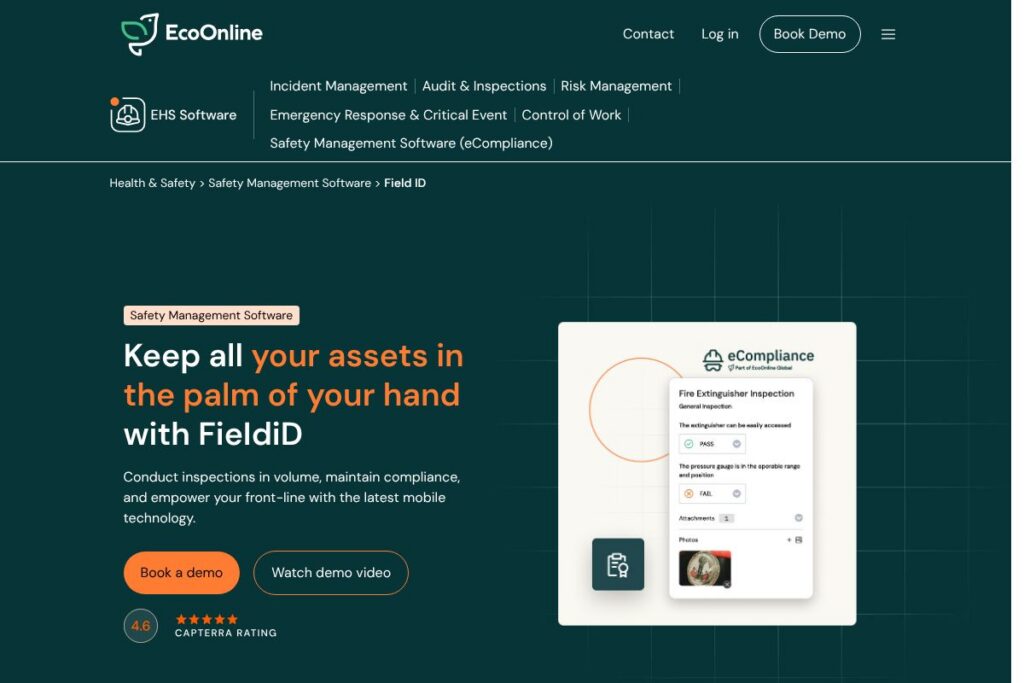
FieldiD is a safety and equipment management platform that combines mobile inspections, asset tagging, and compliance reporting to reduce equipment-related incidents and extend equipment life. The product is delivered as a web and mobile application designed for teams that perform frequent field inspections, audits, and maintenance checks.
Compared with tools such as SafetyCulture (iAuditor), which focuses heavily on template-based inspections and checklists for general inspections, FieldiD places greater emphasis on equipment lifecycle management and tagging workflows. Against asset-centric platforms like Asset Panda, FieldiD pairs inspection automation with tagging and RFID support for on-site workflows rather than only inventory tracking. Compared with maintenance-first tools such as UpKeep, FieldiD leans more toward inspection throughput, compliance dashboards, and mobile offline execution for frontline users.
What FieldiD does particularly well is combine high-volume, repeatable inspections with asset-level tagging and visibility into compliance status. This makes it a practical choice for medium and large organizations in construction, utilities, logistics, and industrial services that need reliable field data collection and audit-ready reporting.
How FieldiD Works
FieldiD runs on mobile devices and a web console that centralizes inspection results, asset records, and compliance dashboards. Field technicians use mobile forms and tagging options to scan or select assets, complete inspections, attach photos, and submit results when online or offline.
The platform supports automatic scheduling and notifications so recurring inspections are assigned and tracked; completed inspections populate the central database for reporting and follow-up. For tagged assets, FieldiD links inspection history to a single asset record so teams can see trends, service history, and open issues tied to a specific item.
FieldiD integrates inspection workflows with audit-ready reporting and configurable dashboards so safety managers can prioritize corrective actions and demonstrate compliance to auditors. Workflows can include conditional checks, required fields, and pass/fail outcomes that drive follow-up work or escalation.
FieldiD features
FieldiD’s core capabilities center on mobile inspections, asset tagging, offline data capture, and compliance reporting. The platform emphasizes volume inspection efficiency, repeatable workflows, and real-time visibility through dashboards and analytics.
Mobile offline execution
The mobile apps let technicians perform inspections without network connectivity and sync data automatically when a connection is available. Offline support preserves images, notes, and tags so field teams remain productive in remote or signal-poor environments.
Equipment inspections and form builder
A configurable form builder supports checklists, conditional logic, and media attachments to standardize inspections across teams. Templates and bulk inspection tools help teams complete large numbers of checks quickly while keeping records consistent for audits.
RFID tagging and asset tracking
FieldiD supports multiple tagging options including barcodes, QR codes, and RFID to identify assets during inspections. Tagging links physical items to a digital record that aggregates inspection history, last service date, and compliance status.
Compliance dashboard and reporting
The platform provides real-time dashboards and exportable reports designed for regulatory compliance and audit preparation. Managers can filter by asset, location, inspector, or time window to produce evidence for inspections and corrective actions.
Dynamic workflows and scheduling
Automated scheduling and notifications ensure recurring inspections are assigned and tracked to completion. Workflow rules can trigger follow-up actions, assign tasks to maintenance teams, and escalate unresolved safety issues.
Analytics and EHS dashboard
Built-in analytics surface trends in equipment condition, common failure modes, and inspection completion rates so organizations can adopt a preventative approach. Interactive dashboards allow managers to drill into root causes and compare performance across teams or sites.
With these capabilities FieldiD helps teams reduce manual data entry, keep inspection records audit-ready, and maintain continuous visibility into equipment health and compliance.
FieldiD pricing
FieldiD offers enterprise-style pricing tailored to organizational needs, with costs commonly based on number of users, connected assets, and deployment requirements. Public, per-seat pricing is not published, so prospective buyers typically engage with sales for options and a tailored quote.
Enterprise and custom pricing
Enterprise – Custom pricing (includes deployment planning, training, integrations, and support). For a tailored quote and detailed plan options, visit the FieldiD product page on EcoOnline or contact EcoOnline sales to discuss deployment and licensing requirements.
What is FieldiD Used For?
FieldiD is used to run regular equipment inspections, manage asset condition records, and demonstrate compliance with safety regulations. Field teams use it to replace paper inspections, capture photo evidence, and tag assets so inspection history follows the asset through its lifecycle.
Typical users include maintenance crews, safety managers, and field technicians in sectors such as construction, utilities, oil and gas, and heavy equipment rental, where mobile data capture and audit-ready reporting reduce risk and downtime.
Pros and cons of FieldiD
Pros
- Offline-capable mobile apps: Reliable offline operation allows inspections to proceed in remote areas and automatically sync when connectivity is restored.
- Asset-level inspection history: Linking inspections to tagged assets creates a single source of truth for service history and condition monitoring.
- Compliance-focused reporting: Dashboards and exportable reports simplify audit preparation and regulatory evidence gathering.
- Support for RFID and multiple tagging methods: Flexible tagging options make FieldiD suitable for diverse asset environments and site constraints.
Cons
- Enterprise pricing model: Custom pricing means small teams may need to contact sales to learn costs rather than seeing transparent per-user plans immediately.
- Integration specifics vary by implementation: Some organizations will require custom integration work to connect FieldiD with existing CMMS or ERP systems.
- Learning curve for advanced workflows: Teams building complex automated workflows or large-scale tagging projects may need time and training to achieve optimal efficiency.
Does FieldiD Offer a Free Trial?
FieldiD offers a paid enterprise product with demos and trial access available on request. Organizations can request a product demonstration and trial environment through EcoOnline to evaluate mobile inspections, tagging, and reporting before committing to a license.
FieldiD API and Integrations
FieldiD provides API access and integration options to connect inspection data with enterprise systems, allowing export or synchronization of asset records and inspection outcomes. For integration details and developer resources, check EcoOnline’s integration and support pages linked from the FieldiD product page on EcoOnline.
10 FieldiD alternatives
Paid alternatives to FieldiD
- SafetyCulture (iAuditor) – Inspection and checklist platform with a strong template library and mobile-first inspection workflows suited to general safety and quality checks.
- Asset Panda – Asset tracking and management focused on inventory lifecycle, audits, and reporting with customizable fields and workflows.
- UpKeep – Maintenance management software that provides work order workflows, preventive maintenance scheduling, and asset tracking for maintenance teams.
- MaintainX – Digital work orders and inspections with a mobile focus for frontline teams performing repairs and compliance checks.
- Cority – Enterprise EHS and industrial compliance platform aimed at large organizations with broad EHS program needs.
- Gensuite – Cloud-based EHS management suite with compliance modules, incident management, and audit tracking.
- MPulse – Maintenance and asset management software with work order management and preventive maintenance scheduling.
Open source alternatives to FieldiD
- Snipe-IT – Open source asset management system that tracks hardware and equipment with inventory history and custom attributes.
- OpenMAINT – Asset and facility management solution for building and infrastructure maintenance, offering asset records and work order management.
- CMDBuild – Web-based open source configuration and asset management platform for building a tailored CMDB and asset workflows.
Frequently asked questions about FieldiD
What does FieldiD do?
FieldiD is a safety and asset inspection platform for mobile teams. It centralizes inspections, links records to tagged assets, and provides dashboards for compliance and equipment condition tracking.
Does FieldiD work offline?
Yes, FieldiD supports offline mobile execution. Inspectors can collect photos, fill forms, and tag assets without a network connection and sync data when connectivity is restored.
Can FieldiD integrate with other maintenance systems?
FieldiD offers API access and integration options. Integrations are typically arranged during implementation to sync inspection data with CMMS, ERP, or other enterprise systems.
How does FieldiD handle asset tagging like RFID?
FieldiD supports barcodes, QR codes, and RFID tagging. Tagged assets are tied to digital records so inspection history and service actions follow the physical item.
How much does FieldiD cost?
FieldiD uses enterprise-style, custom pricing. For specific plan options, deployment costs, and licensing details contact EcoOnline via the FieldiD product page on EcoOnline.
Final verdict: FieldiD
FieldiD is well suited to organizations that need high-volume, mobile-first inspections tied to asset records and compliance reporting. Its offline mobile apps, tagging options, and compliance dashboards make it a strong choice for field-heavy industries that require audit-ready documentation and asset-level traceability.
Compared with SafetyCulture (iAuditor), FieldiD positions itself more toward equipment lifecycle and tagging workflows while SafetyCulture emphasizes flexible checklist templates and a simple inspection-first experience. Pricing for FieldiD is typically negotiated as custom enterprise licensing, whereas SafetyCulture offers published subscription tiers for teams; organizations should weigh the depth of equipment tracking and tagging needs against budget and integration requirements when choosing between them.