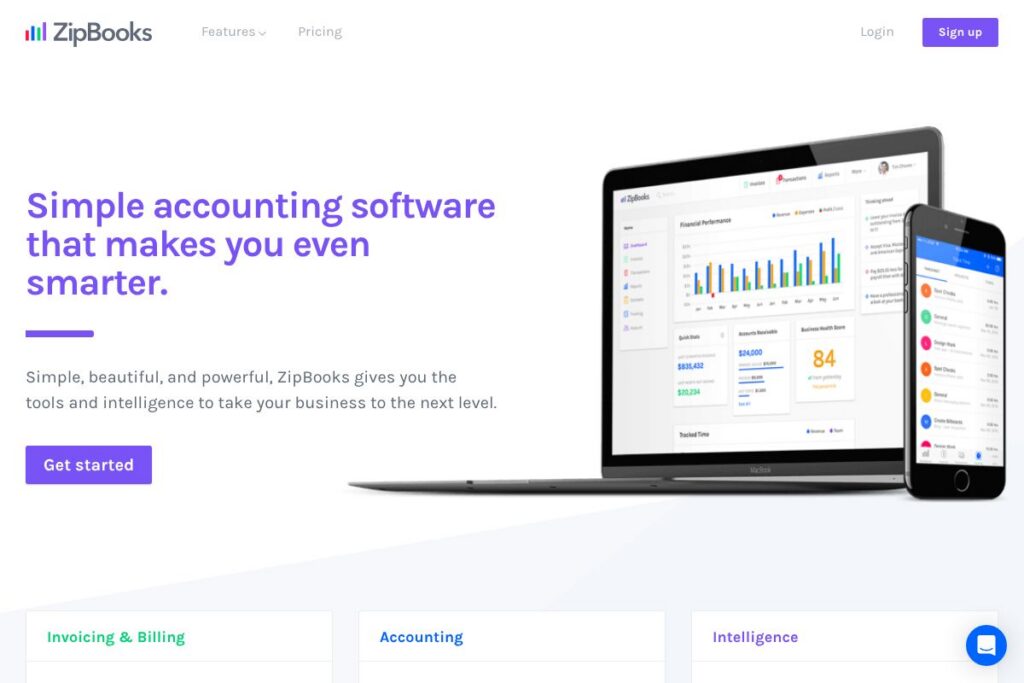

ZipBooks: An Overview
ZipBooks is a cloud accounting application built for small businesses and freelancers who need straightforward bookkeeping, fast invoicing, and helpful financial insights. The product focuses on an uncluttered user interface, automated transaction categorization, and integrated payments so users spend less time on routine accounting tasks and more time on their core work.
Compared with larger accounting suites like QuickBooks Online, Xero, and FreshBooks, ZipBooks emphasizes ease of use and a lower learning curve rather than deep enterprise features. QuickBooks Online usually offers more advanced tax and payroll integrations and tends to cost more per user; Xero provides broader international accounting capabilities for multi-currency businesses; FreshBooks targets service businesses with polished client-facing invoices and time billing. ZipBooks sits alongside these options as a simpler, more accessible choice for businesses that prioritize clarity and fast setup.
ZipBooks does particularly well at reducing the administrative time needed for invoicing and reconciliation, and it suits solo operators, micro-businesses, and small teams that want useful financial intelligence without a steep learning curve. For companies that need advanced tax features or large-scale payroll, a more feature-dense product may be appropriate, but for many small businesses ZipBooks provides the core accounting tools in an approachable package.
How ZipBooks Works
ZipBooks connects to bank and credit card accounts to import transactions daily, then applies auto-categorization rules and a single transactions interface to simplify reconciliation. Users can review suggested categories, tag transactions by customer or project, and confirm entries from one place instead of navigating multiple ledgers.
Creating invoices and estimates is integrated with time tracking and project records so billed hours and expenses flow into invoices with a few clicks. ZipBooks also supports recurring invoices, online payment acceptance, and built-in reminders to reduce days sales outstanding.
Reporting and insights are presented in simple dashboards that surface profitability, accounts receivable aging, and cash flow indicators. The platform uses aggregated data to generate actionable recommendations and to highlight areas where simple changes can improve margins or accelerate collections.
ZipBooks features
ZipBooks centers on core accounting workflows with a mix of automation, billing, and lightweight project tools. Core capabilities include bank connections, invoicing and estimates, time tracking, smart tagging, team permissions, and mobile access. The platform also emphasizes automated insights that use transactional data to suggest practical improvements.
The platform includes several powerful capabilities:
Bank Connect
Bank Connect pulls transactions from linked bank and credit card accounts into ZipBooks on a daily basis to streamline reconciliation. This reduces manual data entry and helps keep books current without constant uploading of statements.
Invoicing and Estimates
Users can create branded invoices and estimates quickly, send them by email, and accept online payments to speed up collections. Invoice templates, automatic reminders, and payment links help reduce manual follow-up for unpaid invoices.
Time Tracking
Time tracking is built into project and task records so you can capture billable hours and convert them to invoice line items with a single action. This makes it easier for consultants and agencies to bill accurately without switching tools.
Smart Tagging
Smart tagging lets you label transactions by customer, project, location, or custom categories to filter reports and produce tag-based income statements. Reports filtered by tags simplify analysis of profitability across services, teams, or campaigns.
Reporting and Insights
ZipBooks provides straightforward financial reports such as profit and loss, balance sheet, and receivables aging alongside automated suggestions based on aggregated data. Those insights aim to identify quick wins that improve cash flow and reduce bookkeeping overhead.
Team Management
Team Management supports multiple users with role-based permissions for invoicing, bookkeeping, time tracking, and reporting. This enables collaboration between owners, contractors, and accountants while limiting access where appropriate.
Mobile Accounting
The mobile web experience and native apps allow you to send invoices, record payments, and capture receipts on the go. Mobile access keeps bookkeeping current for businesses that operate offsite or meet clients in the field.
Recurring Billing and Payments
Recurring billing automates subscriptions and repeat invoices while integrated payment options let customers pay by card or other supported processors. Linking billing and payments directly into the ledger reduces reconciliation work.
With these features combined, ZipBooks seeks to make bookkeeping faster and less error-prone while providing small business owners with clear financial visibility.
ZipBooks pricing
ZipBooks uses a subscription-based SaaS model with tiered plans designed for freelancers through growing small businesses; specific plan details and pricing are provided on their site. For current plan features and the most up-to-date costs, view ZipBooks’ current pricing options.
What is ZipBooks Used For?
ZipBooks is commonly used for invoicing clients, tracking billable hours, and maintaining a simple general ledger for small businesses and independent professionals. It helps businesses send estimates, collect online payments, and reconcile bank transactions without complex accounting training.
Agencies, consultants, design studios, and service providers use ZipBooks to organize projects and convert tracked time into invoices. Small teams also use its tagging and reporting features to monitor profitability by client or project and to manage basic team permissions for collaborative bookkeeping.
Pros and Cons of ZipBooks
Pros
- Clean, easy interface: The user interface is designed for non-accountants, making onboarding and daily bookkeeping faster and less intimidating for small business owners.
- Integrated invoicing and payments: Invoicing ties directly into payment acceptance so you can send an invoice and receive card payments without separate tools, reducing AR friction.
- Smart tagging for reporting: Custom tags allow flexible reporting across projects, customers, or locations, which helps businesses analyze margins by segment.
- Built-in time tracking: Time capture inside the product lets service businesses bill hours accurately and reduces the need for external time-tracking apps.
- Daily bank feeds: Automatic bank and card transaction imports keep books up to date and simplify reconciliation tasks.
Cons
- Limited advanced tax and payroll features: Businesses that need robust payroll, tax filing, or enterprise-level compliance tools may find ZipBooks less feature-rich than larger accounting suites.
- Fewer third-party integrations than major competitors: While it covers core payment and bank connections, companies that need deep integrations with niche apps may need additional tooling.
- Scalability limitations for large organizations: ZipBooks targets small businesses; very large companies with complex chart of accounts or multi-entity requirements may require a different platform.
Does ZipBooks Offer a Free Trial?
ZipBooks offers a free plan alongside paid subscription tiers. The free plan covers core tasks like invoicing, basic bookkeeping, and limited reporting while paid subscriptions add automated insights, advanced reports, team permissions, and priority support. Check ZipBooks’ current pricing options to compare features and any trial periods offered for paid tiers.
ZipBooks API and Integrations
ZipBooks supports bank connections for automatic transaction imports and integrates with major payment processors so you can accept card payments directly on invoices. For details about available connections and developer options, see their section on integration options at the ZipBooks site.
If you need to automate workflows beyond built-in integrations, ZipBooks provides mechanisms for exporting data and syncing with accounting workflows, and they document integration approaches on the product site for developers and partners.
10 ZipBooks alternatives
Paid alternatives to ZipBooks
- QuickBooks Online — Full-featured accounting with payroll, tax tools, and a large integration ecosystem, commonly used by small to mid-sized companies.
- Xero — Cloud accounting with strong bank reconciliation, multi-currency support, and an extensive third-party app marketplace.
- FreshBooks — Focused on service businesses and freelancers with polished client invoicing, estimates, and time tracking.
- Sage Business Cloud Accounting — Offers accounting and compliance features geared toward small businesses that need scalable finance management.
- Zoho Books — Part of the Zoho suite with native CRM and inventory integrations for small businesses that want an integrated stack.
- Wave — A lower-cost option with free core accounting and paid add-ons for payments and payroll, suitable for very small businesses and freelancers.
Open source alternatives to ZipBooks
- GnuCash — Desktop-based double-entry accounting software suitable for small businesses and personal finance, with a traditional accounting interface.
- ERPNext — An open source ERP with accounting modules, inventory, and project management for businesses wanting a self-hosted all-in-one solution.
- Odoo (Community) — The community edition provides accounting modules as part of a broader suite of business apps for companies comfortable self-hosting and customizing.
- Manager — A desktop-first accounting application with optional cloud hosting, useful for basic bookkeeping without a large SaaS commitment.
Frequently asked questions about ZipBooks
What is ZipBooks used for?
ZipBooks is used for invoicing, bookkeeping, and basic financial reporting for small businesses and freelancers. It helps users track income and expenses, send invoices, accept payments, and run simple profitability reports.
Does ZipBooks integrate with my bank and payment processors?
Yes, ZipBooks connects to bank accounts and supports payment processing so you can accept card payments on invoices. Bank feeds pull transactions for reconciliation and payment integrations reduce manual collections work.
How much does ZipBooks cost?
ZipBooks offers a free plan and paid subscription tiers with additional features. For current plan breakdowns and pricing, consult ZipBooks’ current pricing options.
Can ZipBooks handle time tracking and project billing?
Yes, ZipBooks includes time tracking and project organization so billable hours can be pulled into invoices. This makes it suitable for consultants, agencies, and other hourly professionals.
Is ZipBooks suitable for small teams and accountants?
Yes, ZipBooks supports multiple users with role-based permissions and is commonly used by small teams and bookkeepers. Team features let you assign access to invoicing, reporting, and time tracking while maintaining control over sensitive financial functions.
Final Verdict: ZipBooks
ZipBooks delivers a focused accounting experience that reduces the friction of everyday bookkeeping and invoicing for small businesses and freelancers. Its strengths are a clean interface, automated bank feeds and categorization, built-in time tracking, and clear reporting that surfaces practical insights so users can make adjustments without becoming accounting experts.
Compared with QuickBooks Online, which starts at $30/month and targets broader business accounting and payroll needs, ZipBooks is simpler to learn and often more cost-effective for very small teams. If you need advanced payroll, tax filing, or an extensive integration ecosystem, QuickBooks Online may be the better fit; if you want straightforward bookkeeping, fast invoicing, and actionable insights with less setup, ZipBooks is a strong, pragmatic choice.