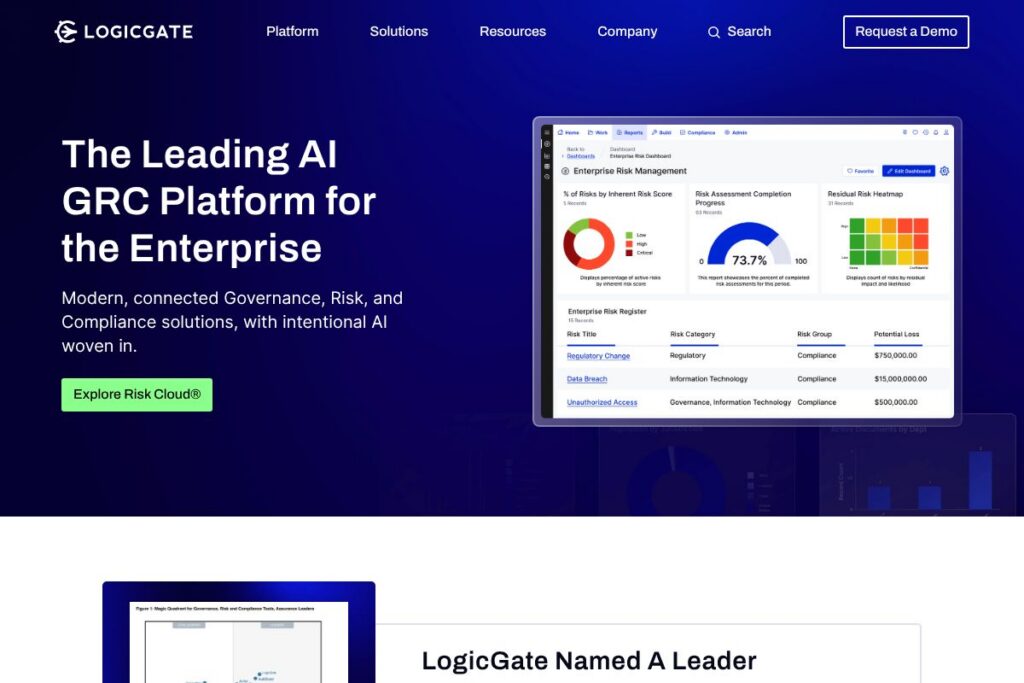

LogicGate: An Overview
LogicGate is a cloud-based governance, risk, and compliance (GRC) platform focused on workflow automation, risk registers, control testing, and evidence management. It organizes GRC programs around configurable workflows and data models so teams can map risks, controls, and incidents into repeatable processes that produce audit-ready records.
Compared with RSA Archer, which is known for its broad enterprise footprint and mature reporting, LogicGate emphasizes fast configuration and a lower-touch setup for mid-market teams. Compared with MetricStream, which targets very large organizations with heavy regulatory requirements, LogicGate is often chosen for its flexibility and faster time-to-value. Compared with OneTrust, which leads in privacy and consent management, LogicGate centers more tightly on risk automation and control orchestration.
All of this makes LogicGate a strong fit for risk and compliance teams that need a configurable GRC platform to automate routine processes, centralize evidence, and provide consistent reporting across third-party risk, operational risk, and internal controls.
How LogicGate Works
LogicGate models a GRC program as a set of configurable objects and workflows. Administrators define risk types, controls, assessments, and business processes as form-based objects that feed into dashboards and reporting views.
Workflows automate tasks such as control testing, issue remediation, and vendor assessments. Notifications, role-based assignments, and escalation rules keep handoffs consistent and auditable while preserving a complete activity trail for audits.
The platform ingests data from spreadsheets, questionnaires, and integrated systems, then maps results to risk registers and control frameworks so teams can track remediation progress and produce evidence for regulators or auditors.
LogicGate features
LogicGate organizes core GRC capabilities around automated workflows and configurable data models. Core functionality includes risk registers, control testing, issue remediation, third-party assessments, and reporting. Recent product additions have focused on expanded automation connectors and improved dashboarding for executive reporting.
Workflow Automation
LogicGate enables no-code workflow building so teams can automate approvals, reminders, and evidence collection without development effort. Automation reduces manual tracking and enforces consistent process execution across control cycles.
Risk Registry and Assessment
A centralized risk register links risk attributes, owner information, and assessment results. Assessment templates let teams capture quantitative and qualitative risk scores that roll up into program-level metrics.
Control Management and Testing
Control libraries and scheduled testing automate control evidence collection and reviewer assignments. Test results and artifacts are stored alongside control definitions to simplify audit preparation.
Third-Party Risk Management
Vendor intake, questionnaires, and tiered assessments let organizations standardize third-party risk evaluations. Integration of vendor scores into the risk register improves visibility into supply chain and vendor exposure.
Reporting and Dashboards
Configurable dashboards present risk heat maps, control coverage, and remediation backlogs. Executive and operational views are customizable, allowing teams to surface program health to different stakeholders.
Policy and Compliance Libraries
LogicGate supports mapping policies to controls and regulations so teams can track compliance obligations and maintain traceable links between policy versions and control evidence.
Integrations and API
The platform offers connectors for ticketing, identity, and cloud platforms to pull evidence and trigger workflows from external systems. These integrations reduce manual uploads and keep risk data in sync across tools.
With these features, LogicGate helps organizations reduce manual work, maintain consistent evidence for audits, and scale GRC processes without heavy customization.
LogicGate pricing
LogicGate uses an enterprise subscription model with custom pricing tailored to organization size, deployment scope, and integration needs. Pricing is negotiated with sales and typically depends on the number of users, modules required, and any professional services for implementation.
For an accurate quote and details about licensing tiers and deployment options, contact the vendor through the LogicGate homepage or request a demo on their site to discuss specific requirements and pricing options.
What is LogicGate Used For?
LogicGate is commonly used to centralize and automate risk workflows such as control testing, vendor risk assessments, and incident remediation. GRC, IT risk, compliance, and internal audit teams use it to create repeatable processes that reduce manual evidence collection and simplify audits.
Organizations also use LogicGate to standardize assessments across business units, map controls to regulations, and produce dashboarded views for executive reporting. It is particularly helpful where teams need configurable workflows rather than one-size-fits-all GRC templates.
Pros and Cons of LogicGate
Pros
- Configurable workflows: LogicGate’s no-code workflow builder lets teams model and automate GRC processes without engineering resources, speeding deployment and reducing maintenance.
- Centralized evidence management: Storing controls, tests, and artifacts in one system makes audit preparation more efficient and reduces time spent searching for evidence.
- Flexible data modeling: The platform supports varied risk taxonomies and assessment templates, which helps organizations cover multiple domains such as third-party risk, operational risk, and compliance.
Cons
- Enterprise focus and pricing: LogicGate uses custom enterprise pricing, which can be less accessible for very small teams with constrained budgets and may require negotiation with sales.
- Reporting depth varies by configuration: Advanced analytics and custom reporting may require additional configuration or professional services to reach the level of insight available in more reporting-centric GRC platforms.
Does LogicGate Offer a Free Trial?
LogicGate offers paid, enterprise plans with custom pricing and does not list a public free plan. Prospective buyers can request a demo or trial through the vendor; contact and demo requests are available on the LogicGate homepage to arrange an evaluation tailored to your environment.
LogicGate API and Integrations
LogicGate provides integration options and APIs to connect with ticketing systems, identity providers, cloud platforms, and data sources so you can automate evidence collection and trigger workflows from other systems. See the LogicGate integrations page for typical connectors and integration patterns.
For developer access, the platform exposes REST APIs and webhook capabilities to push and pull records programmatically; organizations commonly use these endpoints to automate vendor scoring, ingest logs, or synchronize user roles with identity systems.
10 LogicGate alternatives
Paid alternatives to LogicGate
- RSA Archer — Enterprise GRC platform with deep regulatory mapping, mature reporting, and broad deployment in highly regulated industries.
- MetricStream — Large-scale GRC product focused on compliance management, audit, and policy lifecycle for global organizations.
- OneTrust — Strong in privacy, consent, and third-party risk, with a large ecosystem for compliance and data subject request management.
- LogicManager — Risk management and internal audit solution with templates for governance, risk, and compliance programs.
- Riskonnect — Enterprise risk management suite with focus on operational risk, insurance, and incident management.
- NAVEX Global — Compliance management and policy lifecycle solution that also addresses ethics and hotline reporting.
Open source alternatives to LogicGate
- OpenSCAP — Open-source compliance toolkit for automated configuration and vulnerability assessment that can be part of a broader GRC stack.
- Wazuh — Security monitoring and compliance platform that collects security telemetry and supports policy checks for compliance reporting.
- OSSEC — Host-based intrusion detection and log analysis tool that can be used to produce compliance-related evidence when integrated with other systems.
Frequently asked questions about LogicGate
What is LogicGate used for?
LogicGate is used to automate governance, risk, and compliance workflows. Teams implement it to manage risk registers, control testing, third-party assessments, and evidence collection for audits.
Does LogicGate integrate with ticketing and identity systems?
Yes, LogicGate integrates with common ticketing, identity, and cloud platforms. The integrations help automate evidence collection and trigger remediation workflows from external systems.
Can LogicGate support third-party risk management?
Yes, LogicGate supports third-party risk assessments. It provides questionnaires, tiering, and risk scoring features to standardize vendor evaluations across the organization.
How does LogicGate handle reporting and dashboards?
LogicGate provides configurable dashboards and report views. Teams can create executive-level heat maps and operational reports to track remediation and control effectiveness.
Is LogicGate suitable for small businesses?
LogicGate is primarily positioned for mid-market and enterprise organizations. Smaller teams can use it if they need advanced workflow automation, but pricing and deployment usually target larger programs.
Final Verdict: LogicGate
LogicGate excels at making GRC processes configurable and repeatable through no-code workflow automation and centralized evidence management. It is particularly well suited to risk and compliance teams that need to map multiple risk domains into consistent processes and maintain audit-ready records.
Compared with OneTrust, which focuses heavily on privacy and consent, LogicGate tends to be chosen for control orchestration and risk process automation. Both vendors use enterprise pricing models and require vendor discussions for exact costs; LogicGate often provides faster configuration for internal risk programs while OneTrust provides a broader suite for privacy and third-party compliance in regulated environments.
If your priorities are rapid configuration of risk workflows, centralized control testing, and maintaining auditable evidence across programs, LogicGate is a practical choice. For organizations prioritizing a privacy-first stack or cookie/consent management, evaluating OneTrust alongside LogicGate will clarify which platform aligns better with your compliance focus.