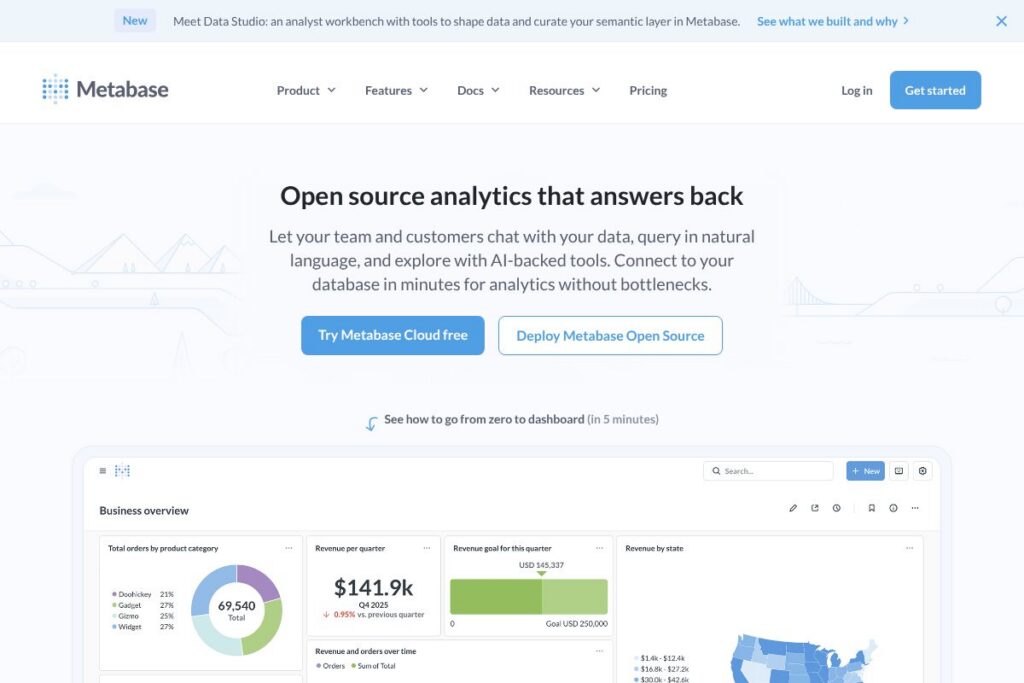

Metabase: An Overview
Metabase is an open-source business intelligence platform that makes it possible for non-technical users to query databases, build visualizations, and share dashboards. It provides a visual query builder, natural language question prompts, and embedded analytics capabilities so product teams, analysts, and customers can interact with data without needing to write SQL for every request.
Compared with enterprise offerings such as Tableau and Looker, Metabase prioritizes simplicity and fast time-to-value. Tableau focuses on advanced visualization and enterprise reporting with a desktop-to-server workflow, while Looker emphasizes semantic modeling and deep integration with cloud data warehouses. Against open-source peers like Apache Superset, Metabase tends to be easier to set up and use for non-technical teams, trading some advanced visualization and extensibility for a simpler user experience.
Metabase does really well at lowering the barrier between questions and answers: anyone can start a visual query, follow built-in drilldowns, or embed a dashboard in a product. All of this makes Metabase a practical choice for startups, product teams, and small-to-midsize companies that need self-serve analytics and embedded reporting without a large analytics engineering investment.
How Metabase Works
You connect Metabase directly to your databases and warehouses, where it introspects schema and tables to build a metadata layer you can query through a visual interface. The platform supports point-and-click question building, saving queries as Questions, combining Questions into Dashboards, and adding filters for interactivity.
Analysts can create curated datasets and semantic metadata that guide non-technical users to consistent metrics. For embedding, Metabase provides secure embedding options and session controls so product teams can surface dashboards inside apps or portals for customers and partners.
Common implementation workflows include self-hosting a Metabase instance using the provided Docker image, connecting core data sources like Postgres or BigQuery, and iteratively shaping a small set of team dashboards before opening the environment to a broader user set.
Metabase features
The platform centers on rapid data access and simple, collaborative analytics. Core capabilities combine no-code querying, lightweight semantic modeling, embeddable dashboards, and support for many popular databases. Recent additions emphasize a Data Studio and a Workbench for analysts to shape and curate data before exposing it to broader teams.
Natural language questions
Users can type plain-language questions and get answers or visualization suggestions, which reduces the need to write SQL for routine inquiries. This helps product managers and customer-facing employees get fast answers during conversations or support flows.
Visual query builder
A drag-and-drop interface lets users build filters, aggregations, and groupings without code, producing charts and tables that can be saved as reusable Questions. This lowers the barrier for ad hoc exploration while preserving query reproducibility.
Dashboards and sharing
Dashboards combine multiple Questions with global filters, layout options, and sharing controls so teams can distribute interactive reports. Dashboards can be scheduled, exported, or embedded into other web properties for customer-facing analytics.
Embedded analytics
Metabase supports secure embedding of Questions and Dashboards into applications, letting product teams offer customer portals or integrated reports. Embedding includes options for signed embeds and access controls to limit data exposure.
Semantic modeling and metadata
Analysts can define metrics, friendly column names, and descriptive metadata so non-technical users query a consistent set of business definitions. This semantic layer reduces duplicated logic and improves metric reliability across reports.
Data source and connector support
Metabase connects to a wide range of databases and warehouses such as Postgres, MySQL, Snowflake, BigQuery, and Redshift, plus many others via JDBC. Connections are configured through the admin UI and can be updated without code deployments.
Alerts and scheduled reporting
Teams can set up alerts or pulses that trigger when specific data conditions are met and deliver scheduled reports via email, Slack, or other channels. This keeps stakeholders informed about key metric changes without manually checking dashboards.
Security and compliance
Metabase includes role-based access controls, row-level permissions, and enterprise features for single sign-on and audit logging. The project emphasizes compliance with standards including SOC and data protection regulations for enterprise deployments.
With these capabilities, Metabase is designed to get teams from zero to a working dashboard quickly while giving analysts tools to curate and govern the metrics that everyone relies on.
Metabase pricing
Metabase follows an open-source core model with optional paid hosting and enterprise offerings. The self-hosted, open-source edition is free to run on your own infrastructure; organizations that want managed hosting or enterprise features can purchase cloud plans or enterprise licenses with custom pricing.
Self-hosted users can deploy locally or in their cloud environment and rely on the open-source codebase available on the project repository. For hosted options and enterprise features such as dedicated support, SSO, and advanced security controls, contact Metabase sales or review the details on the Metabase Enterprise page.
What is Metabase Used For?
Metabase is commonly used for internal dashboards, ad hoc exploration, product analytics, and customer-facing embedded reports. Teams use it to answer day-to-day operational questions, monitor funnels and KPIs, and hand off curated queries to business users without constant engineering support.
It is especially well suited for startups and product teams that need a lightweight analytics layer that can be deployed quickly and scaled, both technically and organizationally, as reporting needs grow.
Pros and Cons of Metabase
Pros
- Open-source core: The self-hosted edition is free and can be modified, which is attractive for teams that prefer ownership of their analytics stack and want to avoid vendor lock-in.
- Easy for non-technical users: Natural language questions and a visual query builder let non-analysts explore data independently, reducing ad hoc report requests to engineers.
- Embedded analytics capable: Secure embedding and simple integration options make it practical to deliver dashboards inside products for customers and partners.
- Broad connector support: Native connections to major databases and warehouses mean Metabase can sit directly on top of existing data infrastructure without ETL for many use cases.
Cons
- Limited advanced visualization: For highly customized or complex visualizations, tools like Tableau or Power BI offer more flexibility and polished presentation options.
- Enterprise features are paid: Advanced security, scalability, and dedicated support are part of hosted or enterprise offerings, which require a commercial contract.
- Scaling and performance tuning: Very large deployments or high-concurrency query loads may need additional engineering for caching, query optimization, or separate analytics infrastructure.
Does Metabase Offer a Free Trial?
Metabase is free and open-source to self-host. You can run a free instance locally or in your cloud environment using the provided Docker image or by following the getting started guide. For hosted or enterprise plans, contact Metabase for trial or demo options via the Metabase Enterprise page.
Metabase API and Integrations
Metabase exposes a REST API for automating tasks such as running saved questions, managing dashboards, and provisioning resources; see the Metabase API documentation for endpoints and examples. Common integration patterns include embedding visualizations, automating exports, and orchestrating user provisioning.
Key native connectors include Postgres, MySQL, Snowflake, BigQuery, and Amazon Redshift, and integration is also possible through JDBC for less-common sources. For embedding, the documentation provides guidance on signed embeds and session management.
10 Metabase alternatives
Paid alternatives to Metabase
- Tableau — A feature-rich, enterprise-grade BI platform with advanced visual analytics and a mature server-based deployment model.
- Looker — A semantic-model-first analytics platform that ties business logic to SQL-based exploration and integrates tightly with cloud warehouses.
- Microsoft Power BI — A Microsoft ecosystem BI tool that combines desktop authoring and cloud service distribution with strong Office integration.
- Mode Analytics — Analyst-first analytics with SQL notebooks, Python/R notebooks, and reporting designed for data teams that blend exploration and operational reporting.
- Sisense — An analytics platform that focuses on embedding and high-performance analytics with a range of deployment options.
- Sigma Computing — Spreadsheet-like analytics on top of cloud data warehouses that targets business users who prefer a familiar interface.
Open source alternatives to Metabase
- Apache Superset — A scalable open-source BI platform with advanced visualizations and SQL Lab for exploratory queries, popular for larger engineering-led deployments.
- Redash — A simple, query-first dashboarding tool with broad connector support and a focus on collaborative SQL-based exploration.
- Grafana — Originally for time-series monitoring, Grafana now supports general dashboards and visualization for a variety of data sources and use cases.
- Lightdash — An open-source analytics frontend built to work with dbt models that enables metric definitions and self-serve exploration.
Frequently asked questions about Metabase
What databases can Metabase connect to?
Metabase connects to a wide range of databases and warehouses. Supported sources include Postgres, MySQL, Snowflake, BigQuery, Redshift, and many others via JDBC; see the data source documentation for the full list.
Does Metabase offer an API for automation?
Yes, Metabase provides a REST API for common automation tasks. The API documentation describes endpoints for running Questions, managing dashboards, and automating administrative actions.
Is Metabase free to use for self-hosting?
Yes, the core Metabase project is free and open-source to self-host. Organizations can run the software on their own infrastructure without licensing costs, and the project source is available via the Metabase GitHub repository.
Can Metabase be embedded in a product for customers?
Yes, Metabase supports secure embedding of dashboards and Questions. Embedding options include signed embeds and session controls to restrict data access for customer-facing reports.
Does Metabase provide enterprise-grade security and compliance?
Metabase offers enterprise security features as part of its paid offerings. These include single sign-on, audit logging, and support for compliance requirements; consult the Metabase Enterprise page for details.
Final verdict: Metabase
Metabase stands out as a practical, open-source solution for teams that need fast, self-serve analytics and embedded reporting without a large analytics engineering footprint. It excels at making data accessible to non-technical users through a visual query builder, natural language questions, and straightforward dashboarding.
Compared with Looker, which emphasizes semantic modeling and enterprise integration and typically comes with a higher price tag, Metabase provides a lower-friction path to usable analytics and a free self-hosted option. For organizations that need advanced visualization, fine-grained governance, or large-scale enterprise support, a paid platform may be preferable; for teams prioritizing speed, simplicity, and control over infrastructure, Metabase is an effective choice.