Rippling: An Overview
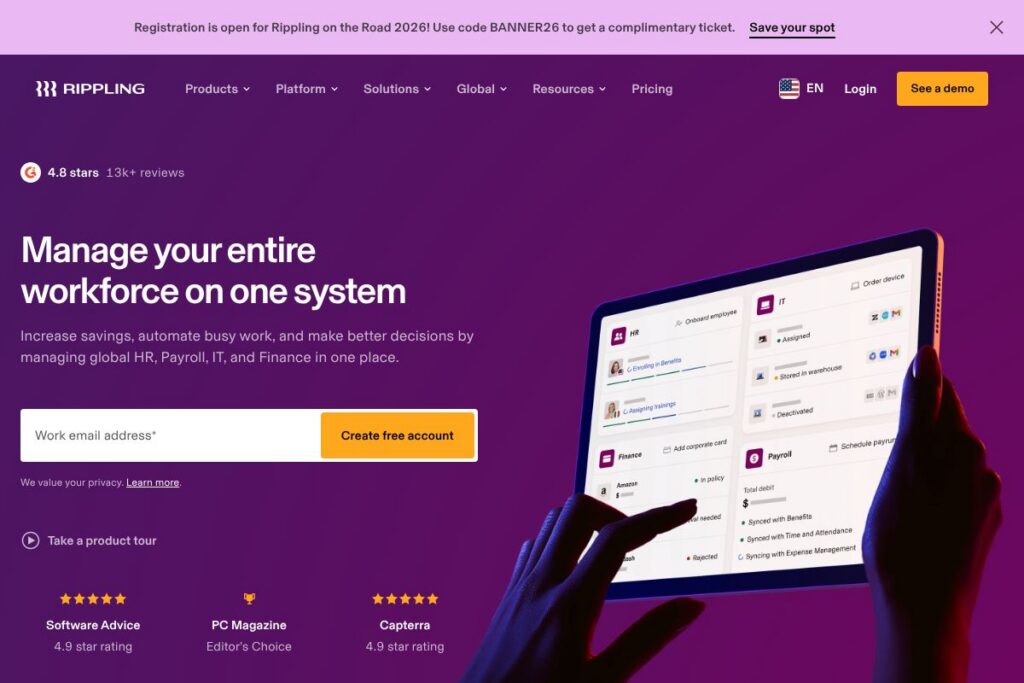
Rippling centralizes core workforce systems by combining HRIS, payroll, benefits, IT device and app provisioning, and finance workflows on a single data model. It is designed for companies that want to replace multiple point tools with one platform so that employee changes flow automatically across HR, payroll, and IT systems without manual data re-entry.
Compared with Workday, Rippling targets faster implementation for small and mid-market teams and adds built-in IT and device management that Workday does not bundle. Against ADP, Rippling offers tighter integrations across IT and finance workflows, while ADP remains a heavyweight for pure payroll scale and compliance services. Compared with BambooHR and Gusto, Rippling provides broader operational coverage beyond HR and payroll, adding device provisioning and vendor payments in the same product family.
All of this makes Rippling a strong fit for growing companies and mid-market enterprises that need unified employee data and automation across HR, IT, and finance. Teams that want to reduce handoffs between departments and automate end-to-end employee lifecycles benefit most from Rippling’s integrated design.
How Rippling Works
Rippling stores a single, structured employee record and uses that record to drive connected workflows across modules. When an HR user updates a hire, termination, or change, the platform can automatically trigger payroll adjustments, benefits enrollment, device provisioning, app access changes, and corporate card issuance.
Typical workflows include automated onboarding that issues laptop access and payroll setup in one flow, offboarding that revokes app access and processes final pay, and finance workflows that route contractor payments and manage expense reimbursements. Administrators configure triggers and approval chains so routine tasks run without manual handoffs, and reporting surfaces where data or approvals are stuck.
What does Rippling do?
Rippling groups HR, payroll, IT, and finance features around a shared data model so teams can remove duplicate entry points and automate cross-department work. Core capabilities focus on employee lifecycle automation, payroll and tax management, device and application provisioning, expense and vendor payments, and centralized compliance controls.
The platform includes payroll and tax processing for domestic and international employees, benefits administration and ACA reporting, centralized employee profiles and org charts, device management and IT cataloging, corporate card issuance and bill pay, and workflow automation that connects those pieces.
Let’s talk Rippling’s Features
Unified Employee Directory
A single canonical employee record keeps personal, payroll, tax, and IT data in one place so changes propagate across systems. This reduces duplicate entry, prevents data drift between HR and finance, and shortens the time it takes to onboard or update employees.
Payroll and Global Payroll
Payroll handles gross-to-net calculations, tax filings, year-end forms, and off-cycle payments, with options for multi-country payroll for international teams. Finance teams benefit from consolidated payroll exports for general ledger reconciliation and automated tax reporting.
IT and Device Management
Rippling provisions and deprovisions devices, Wi-Fi and VPN access, and SaaS app logins in tandem with HR events. IT teams can maintain an inventory of hardware and automate device enrollment, saving time on manual asset tracking and access changes.
Onboarding and Offboarding Automation
Pre-built workflows let HR trigger multi-step onboarding that issues equipment, creates accounts, enrolls benefits, and adds payroll details in one pass. Offboarding workflows can revoke access, collect company property, and trigger final payroll actions to reduce security risks.
Finance: Expense Management and Vendor Payments
Expense capture, corporate card reconciliation, and vendor bill payments integrate with payroll and accounting exports so finance teams close books faster. Automated approvals and scheduled vendor payments reduce manual invoice handling and late fees.
Integrations and APIs
Rippling connects with common productivity, accounting, and identity providers so data flows into existing toolchains. The integration layer lets teams synchronize user accounts, mirror org charts, and feed payroll data into ERPs and accounting software.
Security and Compliance Controls
Role-based access, audit logs, and centralized permission controls help maintain compliance with payroll tax rules and data privacy requirements. Admin consoles provide visibility into who has access to apps and devices, and automatic provisioning reduces human error.
With these capabilities, Rippling’s biggest benefit is eliminating manual cross-team handoffs by using shared data and automated workflows so HR, IT, and finance operate from the same source of truth.
Rippling pricing
Rippling uses a modular SaaS subscription model with custom pricing that varies by the products you enable and your company size. Rather than listing public, fixed plans, Rippling quotes subscriptions that reflect which HR, payroll, IT, and finance modules a customer needs and their number of employees.
For a detailed, current quote and module-level pricing, view Rippling’s current pricing options. For sales inquiries or to request a tailored proposal, contact Rippling’s sales team.
What is Rippling Used For?
Rippling is commonly used to automate hiring-to-pay processes: creating employee records, enrolling people in benefits, running payroll, and issuing devices and app access as part of onboarding. Teams replace disconnected systems so a single HR change triggers payroll updates, equipment provisioning, and expense access without manual steps.
Organizations also use Rippling for IT operations like centralized device inventory, single sign-on provisioning through identity providers, and automated offboarding to reduce security exposure. Finance teams use the platform for payroll reconciliation, vendor payments, and expense policy enforcement to accelerate month-end close.
Pros and Cons of Rippling
Pros
- Unified data model: A single employee record reduces duplicate entry and ensures changes flow across HR, payroll, IT, and finance systems, which speeds onboarding and reduces errors.
- Cross-functional automation: Built-in workflows let HR triggers automatically provision devices, enroll benefits, and schedule payroll actions, cutting manual handoffs between departments.
- IT and device management included: Device provisioning, app access, and corporate card issuance are available in the same platform as HR and payroll, which simplifies IT operations and asset tracking.
- Strong compliance and controls: Role-based permissions, audit logs, and centralized tax handling help teams manage regulatory requirements and maintain secure access.
Cons
- Custom pricing model: Pricing is tailored to modules and company size, which can make initial budgeting less predictable without a sales conversation.
- Enterprise focus may be heavy for very small teams: Smaller companies that only need basic payroll or HR features may find Rippling more feature-rich and complex than required.
- Implementation scope for multi-module deployments: Coordinating HR, IT, and finance policies across multiple teams can extend implementation time compared to single-module tools.
Does Rippling Offer a Free Trial?
Rippling is paid-only with custom pricing and does not provide a public free plan. Companies typically engage with Rippling through a demo or sales-led trial to see module interactions and to receive a pricing proposal tailored to their needs; reach out to contact sales to request a demo.
Rippling API and Integrations
Rippling provides developer-facing APIs and a library of prebuilt integrations to common services, enabling automated provisioning and data exports. The API documentation describes endpoints for user and payroll data, timesheets, and app provisioning.
Key integrations include identity providers and collaboration tools, accounting systems, and HR connectors such as Google Workspace, Microsoft 365, Slack, QuickBooks, Xero, and various SSO and provisioning systems; see Rippling’s integrations gallery for a fuller list.
10 Rippling alternatives
Paid alternatives to Rippling
- Workday — Enterprise-grade HCM and financial management platform with extensive HR and payroll functionality for large organizations.
- ADP — Established payroll and HR services provider with strong tax compliance, advisory services, and payroll scale for businesses of many sizes.
- UKG — Workforce management and HCM suite focused on scheduling, timekeeping, and HR processes for medium to large employers.
- BambooHR — HR-focused platform that simplifies employee records, onboarding, and performance management for small and mid-sized companies.
- Gusto — Payroll-first platform that bundles benefits and HR essentials, aimed at small businesses for simple payroll and benefits administration.
- Zenefits — HR and benefits administration platform for small to mid-sized businesses with integrated benefits and compliance tools.
- Paylocity — Payroll and HR solution with strong payroll features, reporting, and time tracking for mid-sized organizations.
Open source alternatives to Rippling
- OrangeHRM — Open source HR management system covering personnel information, leave and time tracking, and basic recruiting functionality.
- Sentrifugo — Open source HRMS with modules for performance appraisal, employee self-service, and analytics for organizations that can self-host.
- ERPNext — An open source ERP with HR, payroll, and accounting modules suitable for teams that need a broader ERP approach with self-hosting options.
- Odoo — Open source ERP with modular HR, payroll, and accounting apps; flexible for companies that want to assemble only the components they need.
Frequently asked questions about Rippling
What is Rippling used for?
Rippling is used to centralize HR, payroll, IT, and finance operations on a single platform. Organizations use it to automate onboarding, payroll, device provisioning, and vendor payments so employee changes propagate automatically.
Does Rippling integrate with accounting software like QuickBooks?
Yes, Rippling integrates with popular accounting systems such as QuickBooks and Xero. These integrations help finance teams export payroll, expenses, and vendor payments for reconciliation.
How much does Rippling cost?
Rippling uses modular, company-specific pricing rather than public fixed tiers. Costs vary by the products enabled and company size, so contact Rippling’s sales team to receive a tailored quote via their contact page.
Can Rippling handle global payroll?
Yes, Rippling supports multi-country payroll and global workforce management. The platform offers payroll and tax handling for employees in multiple jurisdictions through a combination of in-house and local payroll partners.
Does Rippling provide an API for automation?
Yes, Rippling provides APIs for provisioning, payroll data, and user records. Developers can consult the API documentation to automate workflows and connect Rippling to other systems.
Final Verdict: Rippling
Rippling excels at connecting HR, IT, and finance around a single employee record so organizations can automate end-to-end workforce operations. Its integrated device provisioning, payroll, benefits, and payments capabilities reduce manual handoffs and make cross-functional workflows repeatable and auditable.
Compared with a payroll-focused vendor like ADP, Rippling emphasizes unified automation across HR and IT as well as finance workflows, while ADP remains focused on payroll scale and compliance services. Pricing for Rippling is modular and quoted per customer, so organizations that need combined HR plus IT automation may find Rippling offers more operational consolidation even if it requires a sales conversation to determine exact costs.