Sage AR Automation Explained
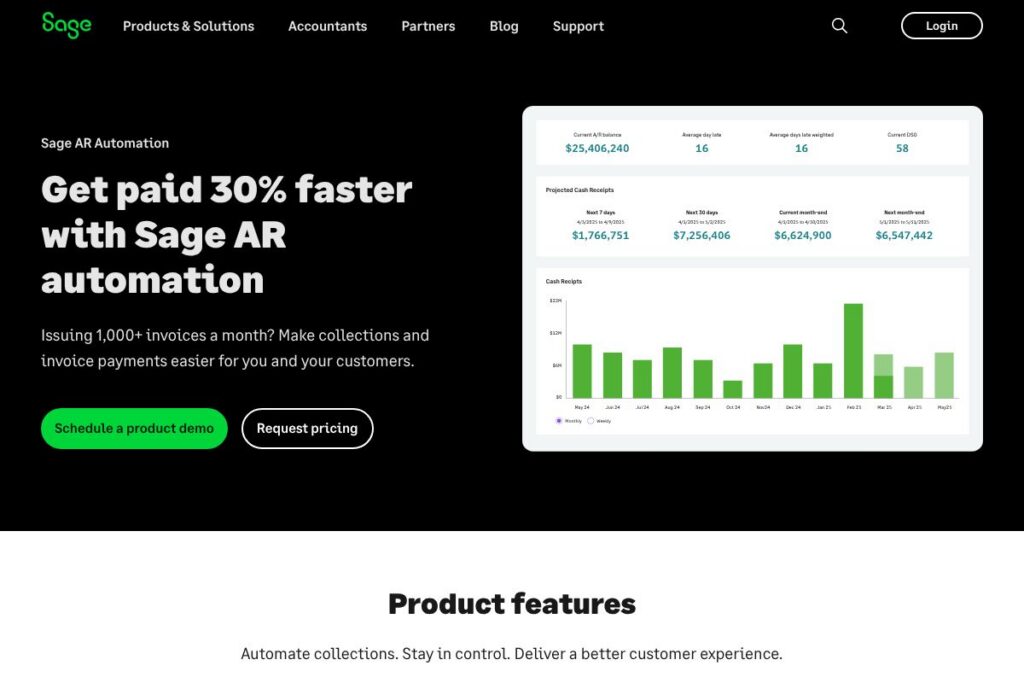
Sage AR Automation is an invoice-to-cash platform built to automate collections, payment processing, and cash-forecasting for organizations that issue large volumes of invoices. It connects bi-directionally with ERPs to keep invoices, payments, and customer data synchronized while presenting customers with a secure self-service portal for credit card, debit, and ACH payments. The product emphasizes automation of multi-channel collections workflows, dynamic credit scoring, and dispute resolution to reduce manual AR effort and shorten days sales outstanding.
Comparatively, HighRadius focuses heavily on AI-driven cash application and credit management with deep machine learning models aimed at large enterprises, while Billtrust centers on electronic invoicing and payment acceptance for mid-market firms with integrated lockbox and remittance processing. Versapay emphasizes customer-facing payment collaboration and portal experiences, which can be more suitable for teams that want real-time buyer-seller negotiation features. Sage AR Automation sits between these offerings by combining ERP-first integration with configurable collections cadences and payment workflows geared to companies that need both scale and ERP alignment.
All of this makes Sage AR Automation especially well suited to finance and collections teams at mid-market to enterprise organizations that send at least 1,000 invoices per month and need predictable implementation and support. It is particularly useful for industries such as manufacturing, distribution, software, construction, logistics, and financial services where predictable cash flow and dispute resolution matter most.
How Sage AR Automation Works
Sage AR Automation synchronizes invoice and customer records with your ERP and then applies configurable rules to prioritize accounts, issue reminders, and route tasks to collectors. Third-party credit reports and a proprietary dynamic payment behavior score help flag higher-risk accounts early so teams can take proactive steps before invoices become overdue.
On the customer side, invoices and statements are presented through a secure self-service portal that accepts card, debit, and ACH payments; payments are applied automatically to open invoices and reconciled back into the ERP. Implementation follows a staged onboarding plan with account and data setup, validation, and user training to ensure collectors and finance managers can use the automation immediately after go-live.
Sage AR Automation features
Sage AR Automation groups core capabilities around collections automation, payment acceptance, ERP integration, and cash-forecasting. Core features include dynamic credit scoring, multi-channel collections cadences, automated cash application, dispute workflows, and integration with over 40 ERPs and multiple payment processors. The platform also reports on key AR KPIs and produces a four-factor cash flow projection to improve short-term visibility.
Dynamic credit and payment behavior scoring
The system pulls third-party credit reports and combines them with on-file payment behavior to assign a dynamic score to each customer. That score feeds collections prioritization and automated decisioning so teams can segment outreach and apply the right cadence based on risk.
Self-service payments portal
Customers can view invoices, statements, and payment history, and pay via credit card, debit, or ACH through a PCI-compliant portal that automatically syncs payments to the ERP. The portal reduces collector touchpoints and improves payment conversion rates by making the payment experience straightforward for customers.
Multi-channel, configurable collections workflows
Collections workflows are customizable across email, SMS, phone reminders, and portal nudges so teams can build cadences that match customer preferences and internal policies. Workflows can branch by response or payment behavior, enabling complex scenarios without manual intervention.
Automated task lists for collectors
Collectors receive prioritized, real-time task lists that update as payments are received or promises are made, focusing effort on accounts that drive cash flow. Automation reduces low-value work and directs staff to high-impact interactions instead of repetitive follow-ups.
Dispute resolution and workflow flexibility
Custom dispute workflows let teams route contested invoices through configurable review and approval steps to accelerate resolution and minimize trapped receivables. Integration with ERP notes and attachments keeps dispute context centralized for faster outcomes.
Four-factor cash flow projection
The platform produces a cash forecast based on promise-to-pay status, expected payment date, predicted payment date, and actual due date to give finance teams a clearer short-term view. This projection helps treasury and FP&A plan more accurately and reduce cash-flow uncertainty.
ERP and payment processor integrations
Sage AR Automation supports bi-directional data flow with over 40 ERPs, including Sage Intacct and Microsoft Dynamics, while integrating with multiple payment processors to accept and reconcile payments. These integrations keep accounting systems current and reduce manual cash application work.
With these capabilities, the biggest benefit is reducing manual AR effort while improving collections outcomes and cash visibility, which helps finance teams scale without proportionally increasing headcount.
Sage AR Automation Pricing
Sage AR Automation follows an enterprise SaaS pricing model with tiered plans and flexible add-ons, and pricing is typically set per-organization based on volume, ERP complexity, and required integrations. Most customers pay an annual amount that covers platform access, implementation, and support, with payment processor fees billed separately.
Enterprise pricing
Typical annual spend – $10,000 to $25,000 per year (varies by invoice volume, integrations, and customization). This range reflects common customer outcomes rather than fixed public plans.
Additional fees
Payment processor fees: Fees vary by provider and transaction type and are charged by the selected payment processor rather than by Sage AR Automation. Implementation or advanced integration work may incur additional professional services fees depending on scope.
For exact plan tiers, customization options, and current availability, view the Sage AR Automation product page or reach out via the contact sales channel to request a tailored quote.
Sage AR Automation Use Cases
Sage AR Automation is used by accounts receivable teams to reduce the time spent on manual collections while improving the customer payment experience. It is useful for companies that need to scale receivables operations without adding headcount, track KPIs like DSO, and reduce dispute lifecycles.
Typical deployments include mid-market and enterprise firms with dedicated collections staff in industries such as manufacturing, distribution, software and technology, construction, logistics, and financial services. Teams use it to centralize communications, accept online payments, and route complex collections scenarios through automated rules rather than spreadsheets and ad-hoc email sequences.
Pros and Cons of Sage AR Automation
Pros
- High-volume collections automation: The platform is built to handle thousands of invoices per month and reduce manual AR effort by automating reminders, tasks, and cash application. This translates to faster payments and reduced DSO for organizations with large billing volumes.
- ERP-first bi-directional sync: Native integrations with over 40 ERPs including Sage Intacct and Microsoft Dynamics keep invoices and payments synchronized, which reduces reconciliation work and improves ledger accuracy.
- Configurable workflows and dispute handling: Customizable collections cadences and dispute workflows mean the product can adapt to diverse billing models and industry requirements without extensive custom development.
- Clear cash-flow forecasting: The four-factor projection provides actionable short-term visibility into expected collections for treasury and finance planning.
Cons
- Enterprise-oriented pricing: The product targets organizations at scale, so smaller teams or businesses with low invoice volume may find the typical annual spend high compared to simpler invoicing solutions.
- Implementation timeline: Integration and data validation follow a multi-week onboarding schedule that requires ERP coordination and data cleanup, which can lengthen time-to-value if internal resources are limited.
- Limited public pricing transparency: Detailed plan tiers are not published publicly and require contacting sales for a customized quote, which can slow initial procurement comparisons.
Does Sage AR Automation Offer a Free Trial?
Sage AR Automation is a paid enterprise product and does not offer a public free plan, but demos and guided pilot discussions are available. Prospective customers can schedule a demo to see product features and discuss pilot options; most evaluations proceed through a staged implementation with data validation and test cases before full go-live.
Sage AR Automation API and Integrations
Sage AR Automation supports bi-directional ERP integrations and connects with over 40 ERPs including Sage Intacct, Sage X3, Sage 100, and Microsoft Dynamics to keep invoice and payment data synchronized. Integration options also cover payment processors such as Paya, Worldpay, Cardknox, SoulPay, Repay, FortisPay, and Stripe for payment acceptance and reconciliation.
If you need developer-level access, consult the platform’s integration resources and implementation services via the Sage AR Automation product page or contact sales to request API documentation and integration guidance.
10 Sage AR Automation alternatives
Paid alternatives to Sage AR Automation
- HighRadius — Enterprise-focused AR automation and credit-to-cash suite with advanced AI for cash application and collections prioritization.
- Billtrust — Electronic invoicing and payment acceptance with lockbox and remittance solutions aimed at mid-market companies.
- Versapay — Customer collaboration and portal-centric AR workflows that combine collections and buyer-seller communications.
- YayPay (by Quadient) — Cloud-based AR automation focused on visibility and predictive analytics for receivables teams.
- Invoiced — Billing, payment acceptance, and collections automation geared to scaling businesses with flexible payment options.
- C2FO — Working capital marketplace that offers early payment and dynamic discounting to accelerate receivables for suppliers.
- Oracle NetSuite — ERP-native AR and billing capabilities that include automation features as part of a broader ERP deployment.
Open source alternatives to Sage AR Automation
- ERPNext — Open-source ERP with invoicing, payment, and basic AR features that can be extended and self-hosted.
- Dolibarr — Modular open-source ERP/CRM that includes invoicing and payment management suitable for small to mid-sized organizations.
- Apache OFBiz — A foundation framework for building custom ERP components including billing and AR modules for organizations willing to invest in development.
- Tryton — Open-source ERP with accounting and invoicing modules that can be tailored for automated receivables workflows.
Frequently asked questions about Sage AR Automation
What industries is Sage AR Automation best for?
Sage AR Automation is well suited to manufacturing, distribution, technology and software, construction, financial services, logistics, and agriculture. These industries typically have recurring or high-volume invoicing and benefit from automated collections and dispute workflows.
Does Sage AR Automation integrate with Sage Intacct and Microsoft Dynamics?
Yes, Sage AR Automation integrates with Sage Intacct, Sage X3, Sage 100, Microsoft Dynamics, and many other ERPs. These bi-directional integrations keep invoices, payments, and customer records synchronized to reduce reconciliation work.
Can customers pay invoices through Sage AR Automation?
Yes, customers can pay via credit card, debit, and ACH using the secure self-service portal. Payments are applied automatically and reconciled back to the ERP to speed cash application.
How much does Sage AR Automation cost annually?
Most customers spend between $10,000 and $25,000 per year depending on invoice volume, integrations, and customization, with payment processor fees charged separately by the selected provider.
Does Sage AR Automation offer API access for custom integrations?
Yes, the platform supports integration options and developer-level access through documented endpoints available during implementation. Contact sales to request API documentation and integration support for specific ERPs and payment processors.
Final Verdict: Sage AR Automation
Sage AR Automation is a purpose-built solution for organizations that need invoice-to-cash automation tightly integrated with their ERP. It excels at handling high invoice volumes with configurable, multi-channel collections workflows, dynamic credit scoring, and automated cash application, which collectively reduce manual AR effort and improve short-term cash visibility. The product’s staged implementation and training model help teams adopt automation without losing control over account handling.
Compared with HighRadius, which is also enterprise-focused and heavy on AI-driven cash application, Sage AR Automation typically positions itself with a stronger ERP alignment and an implementation path geared to Sage customers and similar ERP environments. Pricing for Sage AR Automation commonly falls in the $10,000 to $25,000 per year range for many customers, and while HighRadius pricing is also enterprise and custom, organizations should weigh feature depth in AI and predictive analytics against Sage’s ERP integrations and collections workflow flexibility when choosing a solution.