
Invoice Home: An Overview
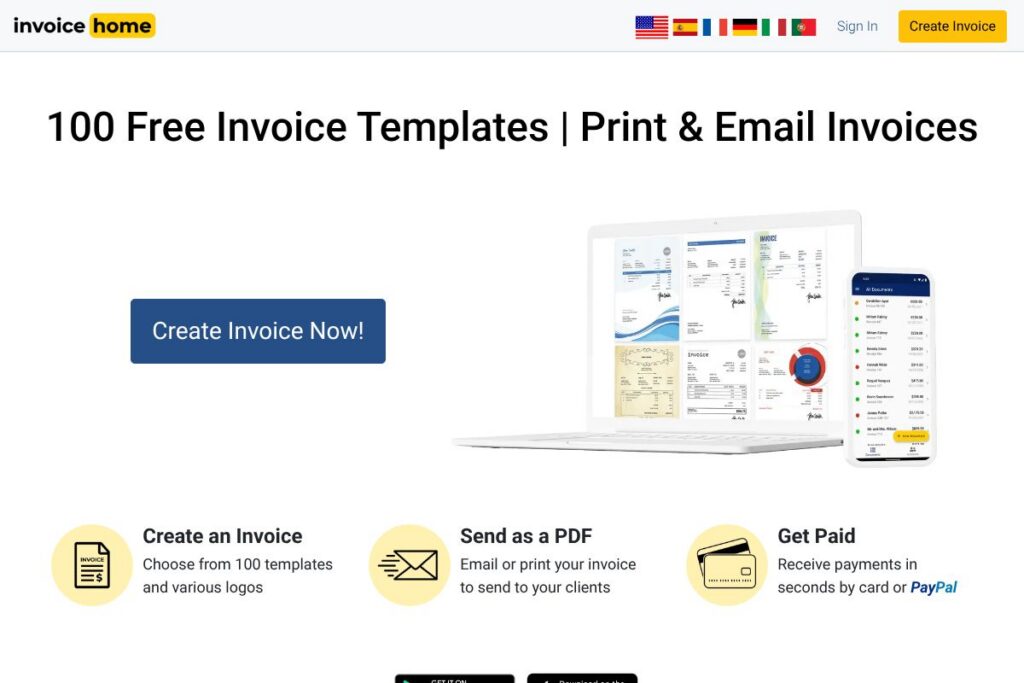
Invoice Home focuses on quick invoice creation using a large library of professional templates and simple delivery options. Users can generate invoices as PDF attachments, print copies, email clients directly from the platform, and attach payment links so customers can pay by card via PayPal or Stripe. The product targets small businesses, sole proprietors, and freelancers who need attractive, repeatable invoices without full accounting complexity.
Compared with FreshBooks, which bundles time tracking, expense management, and accounting features, Invoice Home is narrower in scope and emphasizes template variety and speed of invoice delivery. Compared with QuickBooks, which provides comprehensive bookkeeping, taxes, and bank reconciliation, Invoice Home is lighter and better suited for users who only need invoice creation and basic reporting. Compared with Wave, which offers free invoicing plus integrated payments and bookkeeping, Invoice Home stands out with a larger template gallery and a focus on exportable PDFs and mobile-first workflows.
Invoice Home does invoice design and delivery very well: it helps small teams and independent contractors generate consistent, professional invoices quickly, maintain a cloud-backed invoice history, and accept online payments. This makes it a strong fit for businesses that prioritize presentation and ease of billing rather than full accounting feature sets.
How Invoice Home Works
Invoice Home is template-driven: start by choosing a template, add your business logo or choose a provided logo, enter customer and line-item details, set tax and payment terms, then save the invoice as a PDF or email it directly to the client. The interface keeps fields like invoice number, dates, and totals automated so repeated invoices are faster to produce.
For clients who pay online, attach a payment link that routes to PayPal or Stripe during invoice creation so recipients can pay by card. All invoices you create on mobile or desktop sync to the same account, letting you create invoices in the field and follow up from a computer later.
Practical workflows include generating a quick invoice after a job on-site, saving PDF archives for offline records, and exporting Excel reports for month-end summaries. The mobile apps for Android and iOS let you replicate desktop actions when you are away from your desk, and exported PDFs are suitable for printing or attaching to accounting systems.
Invoice Home features
Invoice Home centers on template variety, PDF export, basic reporting, mobile access, and integration with common payment processors. Recent improvements emphasize mobile availability and secure cloud storage so you can access and resend invoices from any device.
Let’s talk Invoice Home’s Features
Template Library
A gallery of more than 100 professionally designed invoice templates covers a wide range of industries and styles, from minimal business layouts to themed templates for construction, retail, and creative services. Templates are fully editable so you can adjust colors, fonts, and itemized lines to match brand needs, which helps maintain a consistent client-facing image.
PDF Export and Printing
Invoices can be saved immediately as PDF files that preserve layout and branding for printing or offline delivery. The PDF output supports standard paper sizes and is compatible with common printing workflows, making it easy to produce hard copy invoices when required.
Mobile Apps for iOS and Android
Native mobile apps allow you to create, edit, and send invoices on the go without needing a laptop, and all mobile activity syncs with your desktop account. This supports field billing scenarios and quick client-facing invoicing where speed matters.
Cloud Data Storage and Security
Customer records, invoice PDFs, and reports are stored in the cloud so data remains available if a local device fails, and you can access records from any device with WiFi. The platform also offers export options to download PDFs or Excel reports for local backups or to import into accounting tools.
Payment Links and Online Payments
You can add payment links to invoices that direct customers to pay through PayPal or Stripe, enabling card payments and accelerating collections. This reduces friction for clients who prefer online payments and helps small businesses get paid faster.
Branding and Logo Uploads
Upload your business logo or select from free professionally designed logos to personalize invoices and reinforce brand identity. Custom branding options help ensure invoices look professional and consistent across client communications.
Reporting and Exports
Invoice Home provides exportable Excel reports and PDF archives that let you summarize revenue, track top customers, and analyze which services sell best without exporting each invoice individually. These exports simplify month-end review and manual bookkeeping integration.
With this combination of features you get fast invoice creation, professional presentation, and simple payment options, all accessible from desktop or mobile. The biggest benefit is the speed and consistency of generating polished invoices that can be delivered and paid online.
Invoice Home Pricing
Invoice Home provides free access to its collection of templates and basic invoice creation tools, with additional paid or premium features available for users who require expanded capabilities. For the most accurate and current plan options and feature comparisons, check the Invoice Home homepage for current pricing details and plan breakdowns.
What is Invoice Home Used For?
Invoice Home is used for creating, branding, and delivering invoices quickly, including both printed and emailed PDFs. Small businesses and freelancers use it to produce professional-looking bills, attach payment links, and maintain a cloud backup of transaction records.
Common scenarios include on-site billing where the invoice is created and sent immediately from a mobile device, month-end exports of invoice data to Excel for bookkeeping, and using branded templates to present a consistent image to clients. It is ideal when you need a focused invoicing tool rather than full accounting functionality.
Pros and Cons of Invoice Home
Pros
- Large template gallery: A wide variety of professionally designed invoice templates lets users pick styles that match their industry and brand, reducing time spent on layout and design.
- Mobile-first convenience: Native iOS and Android apps let users create and send invoices while on the go, and mobile-to-desktop sync keeps records consistent.
- Simple online payments: Built-in payment link support for PayPal and Stripe makes it straightforward to accept card payments and speed up collections.
- Cloud backups and exports: Storing invoices and customer data in the cloud protects against local device failure and enables quick PDF and Excel exports for reporting.
Cons
- Limited accounting features: The tool focuses on invoicing and does not replace full accounting packages that provide bank reconciliation, payroll, and tax filing tools. This may require additional software for complete bookkeeping.
- Unclear enterprise controls: For larger teams and corporate deployments, the platform lacks the depth of user permissions and advanced reporting commonly found in enterprise billing systems.
Does Invoice Home Offer a Free Trial?
Invoice Home offers a free plan that includes access to 100+ invoice templates and basic PDF and email delivery features. The free tier is suitable for creating and sending invoices; details about premium tiers or trial extensions for paid features are listed on the Invoice Home homepage.
Invoice Home API and Integrations
Invoice Home supports payment links that work with PayPal and Stripe, enabling card payment collection from invoices. For details about setting up payments, refer to the PayPal payment integration and Stripe payment integration documentation.
There is no widely published developer API for deep automation, but the platform supports exporting invoices and reports to PDF and Excel which can be used to integrate with accounting software or custom workflows. Check the Invoice Home homepage for any developer resources or contact options for integration inquiries.
10 Invoice Home alternatives
Paid alternatives to Invoice Home
- FreshBooks — An invoicing and accounting package with time tracking, expense management, and client portals, suitable for freelancers who want bookkeeping built in.
- QuickBooks — A full accounting solution with invoicing, bank reconciliation, payroll, and tax reporting for small to midsize businesses.
- Xero — Cloud accounting software with invoicing, bank feeds, and multi-currency support, aimed at small businesses and accountants.
- Zoho Invoice — Part of the Zoho suite, offers customizable invoices, client portals, and automation rules with cross-product integrations.
- Square Invoices — Integrates invoicing with Square payments and point of sale, useful for retail and service businesses that already use Square.
Open source alternatives to Invoice Home
- Invoice Ninja — An open source invoicing and payments platform that can be self-hosted or used via a hosted plan, with client portals and payment integrations.
- Dolibarr — An open source ERP with invoicing, CRM, and inventory modules suitable for small businesses that prefer self-hosting and modular features.
- ERPNext — A full open source ERP that includes invoicing, accounting, and CRM; better suited for teams that need broader business process coverage.
Frequently asked questions about Invoice Home
What payment methods does Invoice Home support?
Invoice Home supports payment links that connect to PayPal and Stripe. You can attach a payment link to an invoice to allow customers to pay by card through those processors.
Does Invoice Home have mobile apps?
Yes, Invoice Home offers native mobile apps for iOS and Android. The apps let you create, edit, and send invoices on the go and sync automatically with your desktop account.
Can I export invoices from Invoice Home for bookkeeping?
Yes, invoices can be exported as PDF files and reports can be exported to Excel. Those exports are suitable for manual import into accounting systems or for keeping offline records.
Is Invoice Home suitable for freelancers and small businesses?
Yes, Invoice Home is well suited for freelancers and small businesses that need fast, professional invoices. It is particularly useful when branding and quick delivery are priorities.
Does Invoice Home offer an API for automation?
Invoice Home does not advertise a public developer API for full automation. The platform supports PDF and Excel exports plus payment link integrations, and you can contact the vendor through the Invoice Home homepage for integration options.
Final verdict: Invoice Home
Invoice Home excels at producing polished, branded invoices quickly, with a large template library, mobile apps, and simple PDF export and email delivery workflows. It simplifies the billing process for small businesses and freelancers who need attractive invoices and straightforward payment links without the overhead of full accounting systems.
Compared with QuickBooks, which provides a broader accounting and bookkeeping feature set, Invoice Home is lighter and more focused on invoice presentation and speed. For teams that only need professional invoices and basic reporting, Invoice Home is often more efficient; organizations that require comprehensive accounting features should evaluate full accounting platforms alongside Invoice Home.