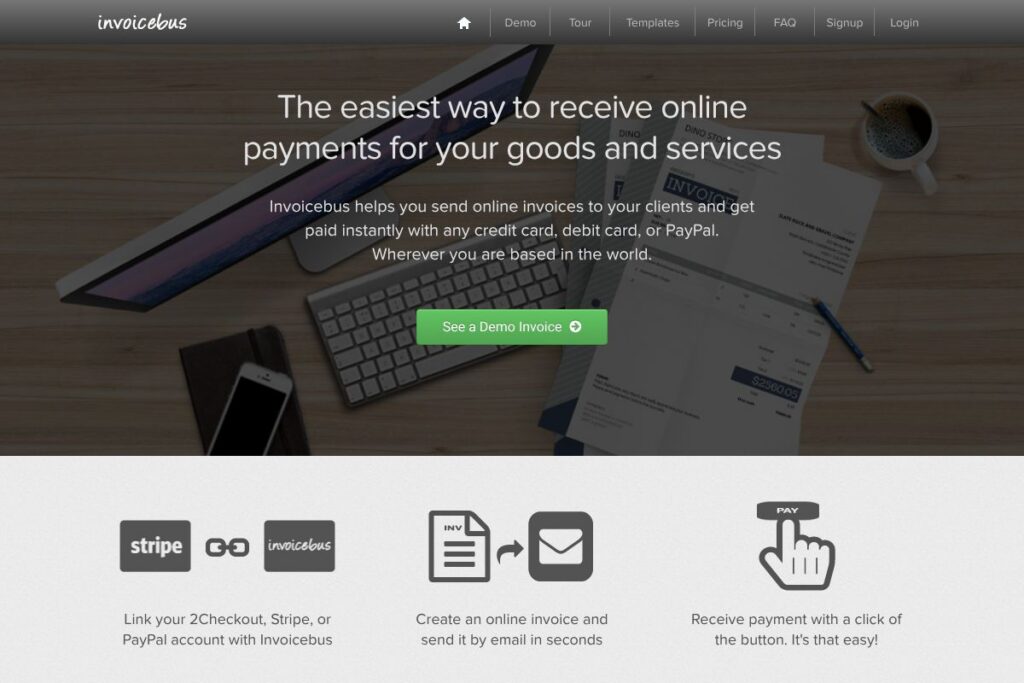

Invoicebus: An Overview
Invoicebus is an online invoicing service built for freelancers, designers, photographers, and other creative professionals who need to create, send, and collect payments for invoices quickly. The platform focuses on fast invoice creation, a selection of templates, and direct payment collection through Stripe, 2Checkout, or PayPal so clients can pay with a click.
Compared with FreshBooks and QuickBooks, Invoicebus aims for a leaner interface with fewer accounting features and more focus on invoice creation and payment flow. FreshBooks targets small businesses with time tracking and expense management, while QuickBooks provides broader accounting and bookkeeping capabilities; Invoicebus is positioned as a simpler invoicing-first alternative for users who do not need full accounting suites.
Invoicebus works particularly well for solo freelancers and small creative teams that need to send polished invoices, accept online payments, and reduce manual follow up. It is useful when you want a fast invoicing workflow without the overhead of a full accounting product.
How Invoicebus Works
Start by connecting your preferred payment processor to Invoicebus so customers can pay online. Invoicebus supports linking accounts for Stripe, 2Checkout, and PayPal to accept credit cards, debit cards, and PayPal payments.
Create an invoice using a template or an HTML template, fill client and line-item details, and send the invoice by email in seconds. Each invoice includes a payment button so clients can complete payment immediately and the platform records the transaction status.
For ongoing work, set up recurring invoices or save client and product profiles to speed future billing. Invoicebus tracks unpaid invoices at a glance and provides basic reporting so you can follow outstanding balances and recent payments.
Invoicebus features
Invoicebus centers on fast invoice creation and online payment collection. Core capabilities include customizable templates, PDF invoice generation, integration with major payment gateways, recurring invoices, and simple client management. Recent additions emphasize streamlined payment links and built-in demo and tour pages to help new users get started quickly.
Online payments
Invoices embed payment buttons that work with Stripe, 2Checkout, and PayPal so clients can pay by card or PayPal in a single click. This reduces friction at checkout and shortens the time between sending an invoice and receiving funds.
Templates and HTML customization
Invoicebus offers ready-made invoice templates and resources for creating HTML invoice templates. Templates help produce professional-looking invoices quickly while customization options let designers match invoices to their brand.
PDF invoice generator
Every invoice can be exported as a PDF for records or for attaching to emails. The PDF generator ensures layout consistency across devices and provides printable copies for clients who need them.
Recurring invoices and automated billing
You can schedule recurring invoices for retainer clients or subscription-style billing so invoices are generated and sent automatically on a cadence you define. This reduces repetitive manual work for ongoing engagements.
Client and item management
Save client details and product or service items to speed invoice creation for repeat customers. Stored profiles make it simple to reuse addresses, tax settings, and pricing across invoices.
Integrations with payment gateways
Invoicebus integrates with Stripe, 2Checkout, and PayPal to process card and PayPal transactions directly from an invoice. Linking a gateway takes a few steps and lets payments post back to the invoice status automatically.
Security and SSL
The platform uses HTTPS and standard security practices to protect payment pages and client data. Secure connections and payment gateway handling keep payment information away from the core application.
With these capabilities, Invoicebus reduces the time spent on billing and payment reconciliation. The biggest benefit is a focused workflow for sending invoices and accepting online payments without navigating a complex accounting product.
Invoicebus pricing
Invoicebus uses a subscription-style SaaS model tailored to freelancers and small businesses, with transaction handling performed by your chosen payment provider. For up-to-date plan options, billing cadence, and any platform fees, check the Invoicebus signup and plan details on the Invoicebus homepage.
What is Invoicebus used for
Invoicebus is primarily used for creating and sending invoices quickly, and for collecting online payments from clients around the world. It is well suited to creative professionals who need polished invoices, simple client management, and fast payment links.
The platform also supports recurring billing for retainers, PDF exports for client records, and basic tracking of unpaid invoices so small teams can manage cash flow without a complex accounting system. Use cases include one-off project invoices, monthly retainers, and event billing where fast payment collection matters.
Pros and cons of Invoicebus
Pros
- Fast invoice creation: Invoicebus reduces the steps required to produce and email an invoice, which helps freelancers bill more frequently and consistently.
- Simple payment collection: Integration with Stripe, 2Checkout, and PayPal enables immediate client payments from the invoice itself, shortening payment cycles.
- Template flexibility: Ready-made templates and HTML template support let creatives match invoices to brand style without advanced setup.
- Lightweight interface: The product focuses on invoicing and payments, making it easier to learn than full accounting suites.
Cons
- Limited accounting features: Invoicebus does not provide full bookkeeping, payroll, or advanced tax reporting found in broader accounting platforms.
- Scaling limitations for larger teams: Organizations that need multi-user permissions, advanced reporting, or deep integrations may find the platform too focused on invoicing only.
- Pricing transparency: With no public detailed pricing page, businesses must sign up or contact the site to confirm exact plan limits and any platform fees.
Does Invoicebus Offer a Free Trial?
Invoicebus offers a free trial for new users. The trial typically provides access to core invoicing and payment features so you can create demo invoices, link a payment gateway, and send invoices; check the signup page for trial duration and any limits.
Invoicebus API and Integrations
Invoicebus connects to major payment gateways including Stripe, 2Checkout, and PayPal to accept payments directly from invoices. See the Stripe and PayPal integration information on the Invoicebus integrations pages for setup steps and requirements.
If you require API access or webhook support for automating invoice events, review the platform documentation linked from the integration pages or contact Invoicebus support via the contact page to confirm developer access and API endpoints.
10 Invoicebus alternatives
Paid alternatives to Invoicebus
- FreshBooks – Cloud invoicing with time tracking, expense management, and more extensive client accounting features.
- QuickBooks – Full accounting platform with invoicing, payroll, and tax reporting for growing small businesses.
- Zoho Invoice – Invoicing tool with automation, multi-currency support, and integration across the Zoho suite.
- Wave – Free invoicing and accounting for small businesses with paid payment processing options.
- Bonsai – Invoicing and contract tools aimed at freelancers with built-in proposals and project workflows.
- Harvest – Time tracking plus invoicing for teams that bill hourly and need integrated time-to-invoice flows.
- Stripe Invoicing – Invoicing backed directly by Stripe payments for tightly integrated payment handling.
Open source alternatives to Invoicebus
- Invoice Ninja – Open source invoicing and payment platform with self-hosted and hosted options, plus support for many payment gateways.
- Siwapp – Simple open source invoicing system aimed at small organizations that can self-host and customize templates.
- Frappe/ERPNext – Broader open source ERP with invoicing modules if you need integrated inventory and accounting features.
Frequently asked questions about Invoicebus
What payment methods does Invoicebus support?
Invoicebus accepts payments via the gateways you connect, most commonly Stripe, 2Checkout, and PayPal. These gateways enable card and PayPal payments on invoice pages.
Can Invoicebus send recurring invoices for retainers?
Yes, Invoicebus supports recurring invoices. You can schedule invoices to go out automatically on a regular cadence for retainer clients or subscription-style billing.
Does Invoicebus let me customize invoice templates?
Invoicebus offers template and HTML template support for customization. That lets you apply branding, adjust layout, and create consistent PDFs for client delivery.
Is Invoicebus suitable for international clients?
Invoicebus is suitable for international billing, provided your payment gateway supports the currencies you need. Multi-currency support depends on the connected gateway and the invoice settings you choose.
How do I connect payment gateways to Invoicebus?
Connect Stripe, 2Checkout, or PayPal through the integrations area in your Invoicebus account. Integration guides and setup steps are available on the Invoicebus integrations pages to walk you through linking an account.
Final verdict: Invoicebus
Invoicebus is a focused invoicing and payment collection tool aimed at creative freelancers and small teams that need to send polished invoices and get paid faster. Its strengths are quick invoice creation, template flexibility, and built-in support for common payment gateways so clients can pay with a single click.
Compared with broader accounting tools like FreshBooks, Invoicebus offers a simpler, more streamlined billing experience with fewer accounting features. For creatives who prioritize a fast invoicing workflow and simple payment integration, Invoicebus is a practical choice; businesses that need full bookkeeping or detailed reporting should compare feature sets and integration options before committing.