
What is Workday
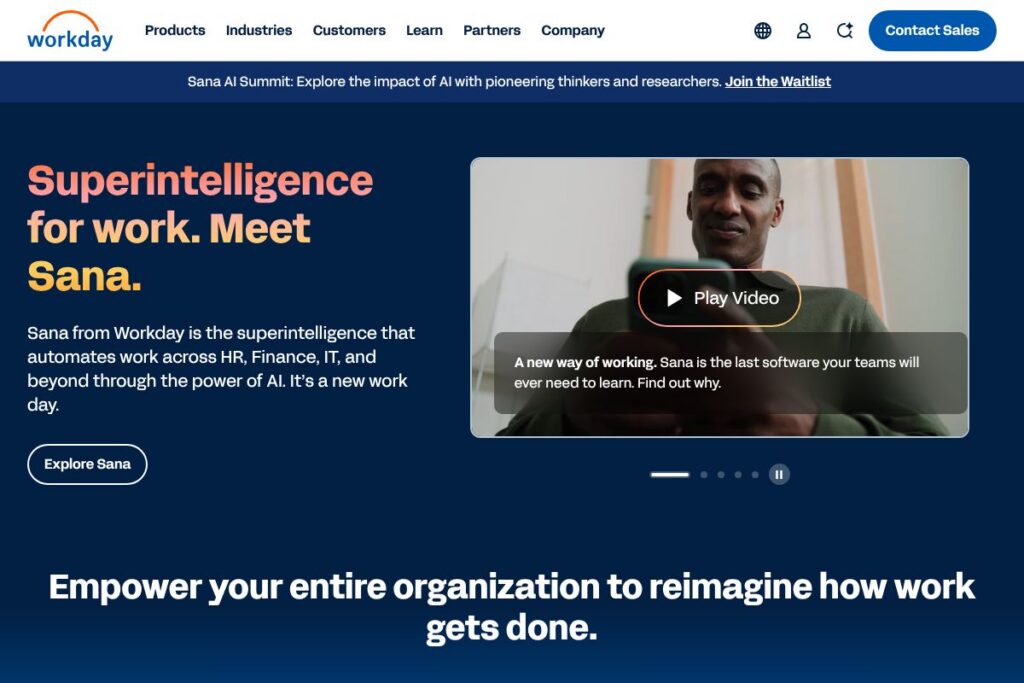
Workday is an enterprise cloud platform that combines human capital management, financial management, payroll, and operational tools on a single data model. It embeds AI capabilities, including the Sana agent, to automate tasks, provide contextual recommendations, and generate insights across HR and finance processes.
Compared with SAP SuccessFactors, Workday emphasizes a single, unified data model and integrated finance modules rather than separate product stacks. Against Oracle Fusion Cloud HCM, Workday focuses on a consistent user experience and an AI-first interface for cross-functional processes. Compared with ADP, which specializes in payroll and workforce services, Workday offers a broader suite of ERP-style finance and planning tools in addition to HCM.
All of this makes Workday well suited for enterprises and large midsize organizations that need a single system for HR and financial workflows, combined reporting, and AI-driven automation. Its combination of HCM, financials, and AI agents is particularly useful for organizations that want to reduce handoffs between HR and finance teams and accelerate decision making.
How Workday Works
Workday runs as a multi-tenant cloud service built around a single, extensible data model so HR, finance, and operational data live in one place. Business processes are defined through configurable workflows and role-based security, which lets teams automate approvals, onboarding, payroll runs, and interdepartmental tasks without duplicating records.
AI agents such as Sana act on that unified data to surface recommendations, draft routine documents, and trigger automations across systems. Typical implementations involve connecting payroll vendors and third-party systems with Workday Integration Cloud, configuring business processes for HR and finance, and rolling out assistant workflows to specific user roles like managers and payroll admins.
Workday features
Workday centers on unified HR and financial operations with embedded AI agents, configurable workflows, planning and analytics, and a set of integration and developer tools. Recent platform additions emphasize generative and task-oriented AI capabilities, deployment tools for midsize customers, and expanded frontline workforce features.
What Makes Workday Stand Out
Sana AI agents
Sana is the AI agent that performs tasks across HR and finance by reading the unified data model, drafting documents, and executing workflows on behalf of users. It can assist with hiring workflows, payroll queries, and routine finance reconciliations, reducing manual steps and accelerating common requests.
Human Capital Management (HCM)
Workday HCM covers recruiting, talent management, benefits, payroll integrations, and workforce planning in a single application suite. The HCM module benefits HR teams by centralizing employee lifecycle data and providing role-based dashboards for managers and HR partners.
Financial Management
Workday Financial Management handles general ledger, accounts payable, accounts receivable, asset management, and financial close processes. Its integration with the HCM data model enables combined reporting such as cost-per-employee and headcount-driven forecasting.
Adaptive Planning and analytics
Workday Adaptive Planning provides budgeting, forecasting, and scenario modeling with a spreadsheet-like experience built for finance teams. Combined with Prism Analytics, finance and HR teams can build cross-domain reports without heavy ETL work.
Integration Cloud and developer tools
Workday offers the Workday Integration Cloud alongside tools like Workday Studio and Enterprise Interface Builder to connect third-party systems and custom workflows. These tools let IT teams build scheduled integrations, real-time data exchanges, and packaged connectors for common enterprise systems.
Security, compliance, and governance
The platform includes role-based access controls, encryption in transit and at rest, and features to help support regulatory reporting and audit trails. These controls are designed to meet enterprise security requirements and support global deployments.
Frontline workforce solutions and Workday GO
Workday provides mobile-first workflows, scheduling, and time tracking tailored to frontline workforces, and Workday GO packages that simplify deployment for midsize organizations. These capabilities address common needs for hourly workers, managers on the floor, and dispersed teams.
With this feature set, Workday is strongest at combining HR and finance data in a single system while applying AI to reduce manual work and improve cross-functional visibility. That unified approach shortens reporting cycles, simplifies audits, and supports more automated operational processes.
Workday pricing
Workday uses an enterprise licensing model with custom pricing based on factors such as the modules selected, number of employees or users, deployment scope, and support options. Pricing is typically negotiated with sales and varies by region and contract terms.
For specific licensing models and tailored estimates, contact Workday sales or review Workday’s enterprise offerings on the Workday products and solutions pages. Procurement teams commonly request a statement of work and total cost of ownership details to compare deployment scenarios and module combinations.
What is Workday Used For?
Workday is used to manage employee lifecycles, from recruiting and onboarding through performance management and payroll, while also providing finance teams with a modern ledgers and planning tools. Organizations use Workday to combine HR and finance reporting so headcount decisions, budget changes, and financial forecasting are based on a single source of truth.
Beyond HR and finance, Workday supports IT and legal workflows such as role-based access provisioning and contract data analysis, plus frontline operations for scheduling and mobile task management. Its AI agents and automation tools are often used to reduce manual approvals, speed routine transactions, and provide managers with actionable insights.
Pros and cons of Workday
Pros
- Unified data model: Centralizes HR and finance records to reduce reconciliation work and enable combined reporting across teams.
- AI-driven automation: Sana and other AI features handle routine tasks, draft documents, and trigger workflows that lower manual work for HR and finance teams.
- Enterprise-grade integrations: Integration Cloud, Workday Studio, and prebuilt connectors allow complex ERP and payroll integrations while preserving data integrity.
- Strong security and compliance: Role-based access, encryption, and audit capabilities support global deployments and regulatory needs.
Cons
- Implementation complexity: Large-scale deployments often require significant planning, professional services, and change management to adapt business processes.
- Custom pricing: Enterprise licensing and custom quotes can make procurement cycles longer for buyers comparing multiple vendors.
- Learning curve for advanced features: Administrators and developers may need training to fully leverage Integration Cloud, Prism Analytics, and advanced AI configuration.
Does Workday Offer a Free Trial?
Workday is offered via enterprise licensing and does not provide a public free plan or self-serve trial. Organizations can request product demos, pilot programs, or proof-of-concept engagements through Workday sales and partner channels to evaluate functionality before committing to a licensed deployment.
Workday API and Integrations
Workday provides a set of developer and integration tools, including REST and SOAP APIs, Workday Studio, Enterprise Interface Builder, and prebuilt connectors for common vendors. The Workday Integration Cloud documentation describes supported endpoints, connector options, and best practices for secure integrations.
Key integrations commonly used with Workday include single sign-on providers, payroll vendors, CRM systems, and BI platforms to feed consolidated HR and financial data into downstream analytics and reporting systems. Teams typically pair the Integration Cloud with middleware or ESB tools for complex enterprise landscapes.
10 Workday alternatives
Paid alternatives to Workday
- SAP SuccessFactors — A modular HCM suite with strong global payroll and talent management capabilities that integrates with SAP’s ERP ecosystem.
- Oracle Fusion Cloud HCM — A broad HR and finance cloud suite that emphasizes scalability and deep integration with Oracle cloud applications.
- UKG — Payroll and workforce management leader focused on shift-based and hourly workforces with strong scheduling and timekeeping features.
- ADP Workforce Now — Comprehensive payroll and HR services with strong payroll compliance, tax filing, and outsourcing options.
- Ceridian Dayforce — Single-application platform for HCM and payroll with real-time payroll calculation and scheduling features.
- BambooHR — HR-focused platform for small and midsize businesses with an emphasis on ease of use and employee lifecycle management.
- Paycom — Payroll-centric HR suite that integrates talent management, HR, and payroll with a single-database approach.
Open source alternatives to Workday
- Odoo — Open source ERP with HR and accounting modules that can be extended through community apps and self-hosting options.
- ERPNext — Open source ERP that includes HR, payroll, and accounting modules designed for small to midsize organizations.
- OrangeHRM — Open source HR management system that covers core HR functions such as attendance, leave, and personnel information.
- Sentrifugo — Free HRMS with performance appraisal, onboarding, and analytics modules suitable for smaller teams.
Frequently asked questions about Workday
What is Workday used for?
Workday is used for enterprise human capital management and financial operations. Organizations deploy it to centralize HR, payroll, financial accounting, and planning on a single platform.
Does Workday have an API for integrations?
Yes, Workday provides REST and SOAP APIs along with Integration Cloud tools. Developers can use Workday Studio, Enterprise Interface Builder, and documented endpoints to connect third-party systems and automate data flows.
How much does Workday cost?
Workday uses custom enterprise licensing rather than public per-user pricing. Costs depend on chosen modules, number of employees, deployment scope, and support levels, so teams typically request a tailored quote from Workday sales.
Can Workday handle global payroll and compliance?
Yes, Workday supports global payroll and compliance through partner integrations and local payroll vendors. The platform includes features to manage multi-country tax and statutory reporting when configured with regional payroll services.
Is Workday suitable for midsize businesses?
Workday offers options tailored to midsize customers, including packaged deployments like Workday GO. These packages aim to simplify deployment and reduce time to value while keeping the core unified data model and automation capabilities.
Final verdict: Workday
Workday excels at combining HR and financial systems on a single cloud platform with AI agents that automate routine work and surface cross-functional insights. Its unified data model, Integration Cloud, and analytics capabilities reduce the need for separate reporting systems and help organizations shorten financial close cycles and operational handoffs.
Compared with Oracle Fusion Cloud HCM, Workday tends to emphasize a consistent user experience and AI-driven assistants, while Oracle offers a broader set of enterprise applications and migration options from legacy on-premise systems. Both use enterprise licensing and require vendor discussions to get accurate pricing, so buyers should evaluate total cost of ownership, implementation effort, and the specific automation features they need before choosing between them.
If your organization needs a consolidated HR and finance platform with built-in AI agents and strong integration tooling, Workday is a leading option to evaluate through demos and pilot engagements. For procurement and tailored pricing, contact Workday sales or request a demonstration through the Workday contact and sales pages.