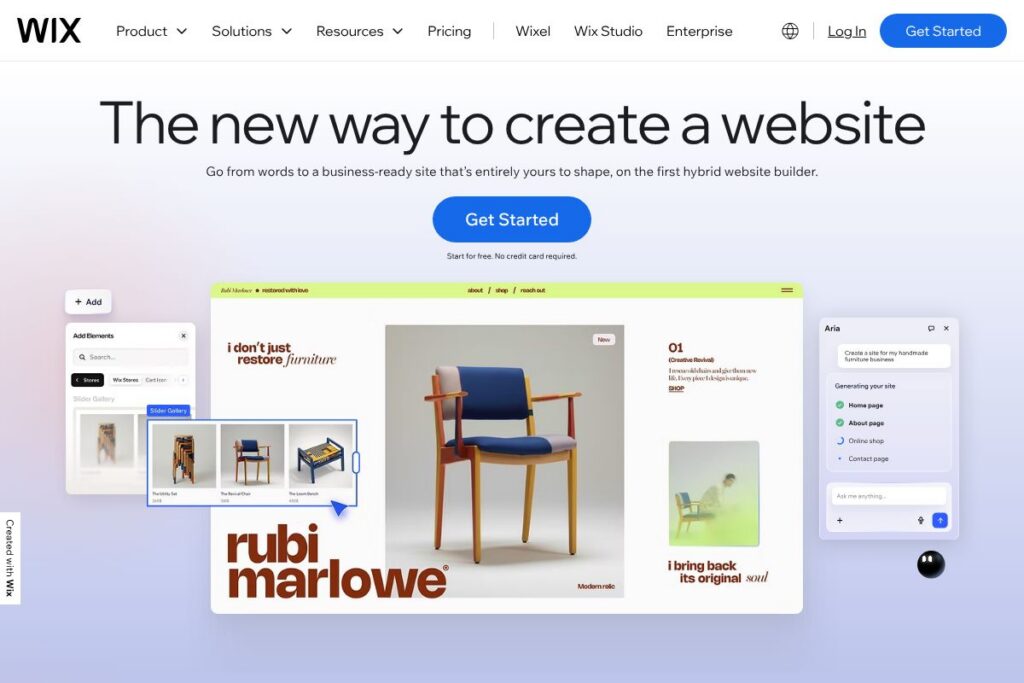

Wix: An Overview
Wix is a cloud-hosted website builder that lets users create sites without coding by combining a visual drag-and-drop editor, more than 2,000 templates, and AI-assisted site generation. Its platform covers a wide range of needs from simple portfolios and blogs to full eCommerce stores, booking systems, and course platforms, all managed from a single dashboard. The product is designed for makers, small businesses, freelancers, and creators who want a single environment for design, hosting, and business tools.
Compared with Squarespace, WordPress, and Shopify, Wix sits between template-first builders and flexible hosted platforms. Compared to Squarespace, Wix offers a larger template library and a more modular app marketplace. Compared to WordPress, Wix trades extensibility for an integrated, managed experience that removes hosting and plugin maintenance. Compared to Shopify, Wix targets general-purpose websites and small to mid-size stores rather than large multi-channel retailers.
Wix excels at letting non-technical users launch a business-ready website quickly while offering depth for customization when needed. It is best for small businesses, creatives, and solopreneurs who want fast setup and centralized site management without hiring developers.
How Wix Works
The platform offers two primary creation paths: AI-assisted generation and template-based editing. The AI website builder asks a few questions about your site, then produces a complete site structure, pages, and content that you can refine. Templates provide a starting layout you can fully customize using the Editor.
Editing happens on a visual canvas where you can drag, drop, and layer elements at pixel-level precision. Add apps from the Wix App Market to extend functionality for bookings, payments, forms, or integrations. Publish and host directly on Wix’s multi-cloud infrastructure, then manage SEO, marketing, and analytics from the site dashboard.
Typical workflow example: start with the AI builder to generate a site, use the Editor to adjust layout and styles, add eCommerce or booking apps, connect a custom domain, and set up automated marketing and CRM flows to capture and nurture visitors.
What does Wix do?
Wix is organized around website creation and business operations for small and mid-size organizations. Core capabilities include a visual Editor, AI website generation, a template library, eCommerce and bookings, integrated marketing tools, and a CRM system that connects site visitors to automated workflows. The platform has recently expanded AI features that assist with content generation, design suggestions, and SEO optimization.
Let’s talk Wix’s Features
AI Website Builder (Aria)
Wix’s AI site builder can generate a complete website from a short brief, including page structure and suggested content. It speeds the initial build process and produces a functional starting point you can manually refine in the Editor.
Templates Library
The platform provides over 2,000 designer-made templates organized by industry and use case. Templates are fully customizable so teams can start fast while keeping a consistent visual identity across pages.
Drag-and-Drop Editor
The Editor offers pixel-level placement, layers, and responsive controls for desktop and mobile views. It supports complex layouts without code and provides style settings to apply fonts and colors across the site.
eCommerce and Payments
Wix includes an online store system for product listings, inventory, shipping, tax rules, and order management. It supports Wix Payments and major third-party gateways to accept credit cards and alternative payment methods.
Scheduling and Bookings
Built-in scheduling tools let service businesses accept bookings, manage staff calendars, and process payments from the same dashboard. It integrates with notifications and calendar systems to reduce manual coordination.
Marketing and SEO Tools
Wix provides an SEO assistant, AI-generated meta tags and descriptions, and direct integrations for Google Search Console and ad platforms. The marketing suite includes email campaigns, social post scheduling, and ad creation from the site dashboard.
CRM and Automations
A CRM built into the dashboard captures leads, segments contacts, and runs automated emails, reminders, and workflows. These automations help convert visitors into customers without external systems.
Hosting, Security, and Performance
Wix hosts sites on a multi-cloud infrastructure with global CDN, SSL, and DDoS protections. The platform focuses on fast page loads and uptime guarantees, with automatic backups and monitoring.
With Wix you get a single environment that covers design, commerce, bookings, marketing, and analytics, so teams can build and run an online presence end-to-end.
Wix pricing
Wix uses a freemium subscription model with free sites supported by Wix-branded subdomains and paid Premium plans for custom domains, commerce features, and advanced capabilities. Pricing is tiered by target use case, from personal websites to business and enterprise needs, and options differ when billed monthly versus annually.
Monthly Billing:
- Individuals: Free plan available for basic websites; paid monthly plans remove ads, allow a custom domain, and increase storage and bandwidth.
- Business & eCommerce: Monthly Premium tiers unlock online sales, payment processing, and commerce tools designed for shops and service providers.
- Enterprise: Custom monthly arrangements are available for large organizations needing advanced SLA, security, and multi-site management.
Annual Billing:
- Individuals: Annual billing typically reduces the effective monthly cost and often includes promotional benefits such as a free domain for the first year when you choose an annual plan.
- Business & eCommerce: Annual plans are commonly bundled with additional marketing credits and priority support compared with month-to-month subscriptions.
- Enterprise: Enterprise contracts are negotiated annually and include tailored support, onboarding, and feature sets.
For the latest plan names, exact features, and current rates, view Wix’s current pricing options and compare tiers for Individuals, Business, and Enterprise.
What is Wix Used For?
Wix is commonly used to build marketing websites, personal portfolios, blogs, small online stores, hospitality and restaurant sites, appointment-driven services, and online course pages. Its integrated booking and commerce tools make it practical for freelancers, local businesses, and creators who need both a storefront and client management in one place.
Teams use Wix to prototype and launch a site quickly, then scale features as needs grow by adding apps, automations, or commerce capabilities. The platform supports launching landing pages for campaigns, running email and social campaigns, and tracking results with built-in analytics.
Pros and Cons of Wix
Pros
- Large template and component library: The platform includes over 2,000 templates and thousands of free design components that accelerate site creation and customization.
- Accessible no-code editor: The drag-and-drop Editor and AI site generation let non-technical users build polished sites quickly while offering advanced controls for designers.
- Integrated business tools: eCommerce, bookings, CRM, email marketing, and analytics are available in one dashboard, reducing the need for external integrations.
- Managed hosting and security: Multi-cloud hosting with SSL, DDoS protections, and a global CDN simplifies performance and security management.
Cons
- Less extensible than self-hosted platforms: Custom server-side logic and highly bespoke integrations are easier to implement on self-hosted platforms like WordPress or custom frameworks.
- Template switching limitations: Large structural changes or switching templates after launch can require manual rework, which adds migration overhead for mature sites.
- Cost for advanced features: Removing platform branding, connecting a custom domain, or enabling full eCommerce requires a paid Premium plan; costs can rise as you add marketing and app subscriptions.
Does Wix Offer a Free Trial?
Wix offers a free plan and paid Premium upgrades. The free plan allows full use of the Editor and publishing to a Wix subdomain so you can build and test without a credit card. Paid Premium plans unlock custom domains, remove Wix ads, and add commerce and advanced marketing features; check the upgrade options for trial policies and promotional offers.
Wix API and Integrations
Wix provides developer tools and APIs through the Wix Developers platform for extending sites, building custom interactions, and creating apps for the App Market. The Wix Developer documentation covers APIs for data collections, site members, payments, and custom code components.
For non-developers, Wix integrates with common marketing and analytics services including Google Analytics, Google Search Console, Facebook Pixel, PayPal, Stripe, and Zapier. Many third-party apps can be added directly from the Wix App Market.
10 Wix alternatives
Paid alternatives to Wix
- Squarespace — A design-focused website builder with elegant templates and strong editorial and commerce features for creatives and small businesses.
- Shopify — An eCommerce-first hosted platform suited for merchants who need multi-channel selling and advanced store management.
- Weebly — An easy-to-use website builder with simple commerce tools, often chosen for low-cost small business sites.
- Webflow — A visual design and CMS platform geared toward designers who need precise control and production-ready code exports.
- WordPress.com — A hosted variant of WordPress combining themes and plugins with managed hosting and tiered business features.
- BigCommerce — A hosted commerce platform for growing online retailers that need advanced sales features and scalability.
- GoDaddy Websites + Marketing — A simplified site builder bundled with marketing tools and domain registration aimed at small business owners.
Open source alternatives to Wix
- WordPress (self-hosted) — A highly extensible CMS with thousands of themes and plugins; requires separate hosting and maintenance.
- Joomla — A flexible open-source CMS that balances content management and extensibility for mid-sized sites.
- Drupal — A powerful CMS for complex, highly customized sites with robust content modeling and access control.
- Grav — A flat-file CMS focused on speed and simplicity for developers who prefer file-based site structures.
Frequently asked questions about Wix
What is Wix used for?
Wix is used to create and host websites without coding. People use it for portfolios, business sites, online stores, blogs, booking sites, and course pages managed from a single dashboard.
Does Wix have a free plan?
Yes, Wix offers a free plan. The free tier includes the Editor and publishing to a Wix-branded subdomain; Premium plans are required for custom domains and advanced features.
Can Wix handle eCommerce?
Yes, Wix supports eCommerce. Its commerce features include product listings, inventory, shipping rules, payment processing, and order management for small and medium stores.
Does Wix provide an API for developers?
Yes, Wix has developer APIs and a developer platform. The Wix Developer documentation explains available APIs, site code, and how to build custom apps for the Wix ecosystem.
How do I connect a custom domain to Wix?
You can connect or buy a custom domain with Wix. Free sites use a wixsite.com subdomain; Premium plans allow you to connect an existing domain or register a new one through Wix, and some annual plans include a free domain for the first year.
Final Verdict: Wix
Wix is a versatile, user-friendly website builder that combines an approachable no-code Editor with AI-assisted site creation and a broad set of business features. It does a good job of packaging hosting, security, commerce, bookings, marketing, and CRM into a single product so non-technical users can build and run a site end-to-end.
Compared to Squarespace, Wix provides a larger template library, more modular app options, and a free plan that makes experimentation low-cost. Squarespace tends to emphasize design cohesion and a more opinionated editor, while Wix offers greater flexibility and a wider range of integrated business tools, with pricing and plan structure that scales according to site complexity and commerce needs.
If you want to launch a website quickly, iterate visually, and manage marketing and customer workflows from one dashboard, Wix is a practical choice. For highly bespoke platforms or very large commerce operations, consider developer-focused alternatives or dedicated eCommerce platforms.