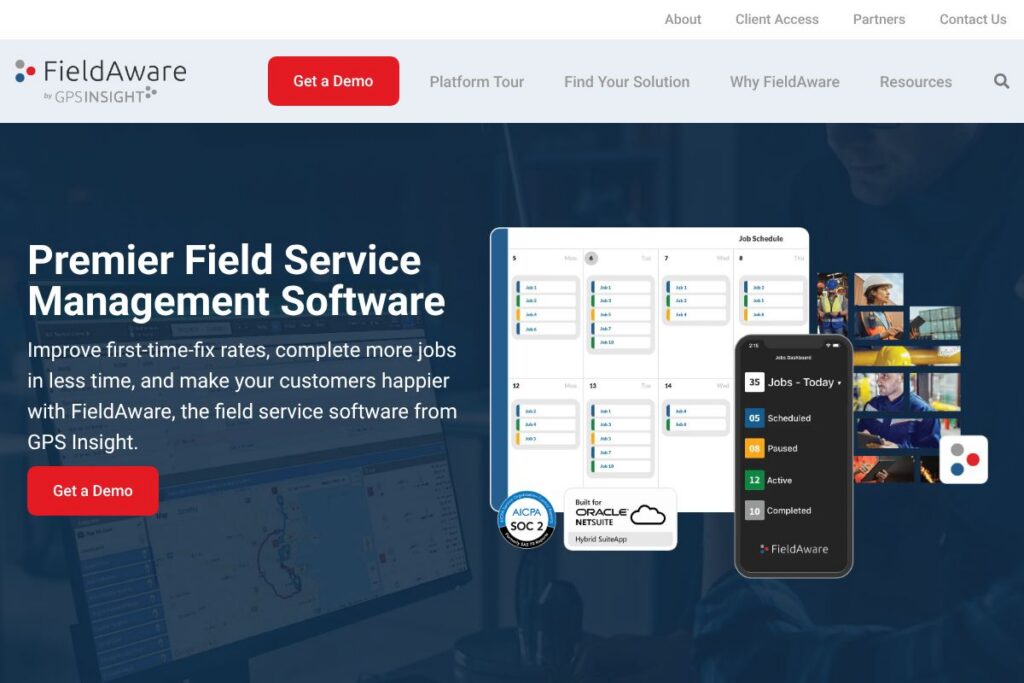

What is FieldAware
FieldAware is a field service management platform built to connect back-office operations with mobile field technicians. It centralizes scheduling, dispatch, work orders, invoicing, and asset data while putting job details, customer history, and custom checklists into a native mobile app for Android and iOS.
Compared with competitors, FieldAware takes a mobile-first approach that emphasizes simple mobile workflows and rapid access to job details. ServiceTitan targets residential contractors with deep business management features and a higher-touch sales model, Jobber focuses on smaller service businesses with simple scheduling and invoicing, and ServiceMax is aimed at heavy enterprise asset-centric organizations with complex field-service engineering needs. FieldAware fits between these tools by offering a scalable mobile-driven FSM that can serve small fleets up to enterprise deployments.
FieldAware works well for organizations that need a straightforward, mobile-focused solution to reduce paper, speed technician response, and tie field activity to billing and reporting. Its strengths are mobile usability, practical dispatch tools, and integrations with ERPs and telematics that keep field and office teams in sync.
How FieldAware Works
Office staff create and manage work orders, schedule resources, and configure service areas and skills within the FieldAware dashboard. The Smart Scheduler automates or suggests assignments based on availability, location, and required expertise, then pushes the schedule to technicians in real time.
Technicians receive assignments in the FieldAware mobile app, view customer history, complete custom checklists, capture photos and signatures, and generate time and parts entries on the job. Completed work orders can be converted into quotes or invoices and synchronized back to accounting systems, removing duplicate data entry and shortening billing cycles.
Dispatchers monitor job and vehicle status on the dashboard, track technician location and progress, and reroute teams as needed to improve first-time-fix rates and reduce travel time. Management uses reporting and dashboards to monitor KPIs, job costing, and resource utilization to plan operational changes.
FieldAware features
FieldAware centers on mobile work order execution, automated scheduling, real-time dispatch, and integrations that connect field activity to finance and asset systems. Core capabilities include a native mobile app for technicians, Smart Scheduler for automated dispatching, offline access, customizable forms and checklists, billing and invoicing workflows, and reporting. Recent product focus has emphasized tighter ERP integrations and improved mobile usability.
The platform includes several powerful capabilities:
Mobile App and Offline Access
The native mobile apps provide technicians with job details, schematics, photos, and customer history, and support offline data capture that syncs when connectivity returns. This reduces paper and ensures technicians can complete jobs in remote areas without losing captured data.
Smart Scheduler and Dispatch
Smart Scheduler automates assignment logic based on skill, location, and availability, and visual dispatch boards let operators see job status and technician locations in real time. This reduces manual rework and shortens response times for urgent jobs.
Work Order and Job Management
Create, edit, and close work orders from the office or the mobile app, including parts, labor, and service tasks; custom forms capture inspections, safety checks, and compliance data. Technicians can attach photos, get customer sign-off, and escalate incomplete work orders for follow-up.
Invoicing and Billing Integration
Convert completed work orders into quotes and invoices on the spot, and sync billing details with accounting systems to accelerate cash flow. Built-in tracking for billed versus paid jobs helps finance teams reconcile and follow up on outstanding payments.
Reporting, Analytics, and KPI Tracking
Pre-built and configurable reports let managers analyze first-time-fix rates, technician productivity, job profitability, and parts usage. Scheduled reports and dashboards surface trends that inform hiring, routing, and pricing decisions.
Asset and Inventory Management
Track assets, serials, warranties, and installed base details within job records, and pull parts usage into inventory reports that help control costs and reorder critical components. Asset histories improve troubleshooting and service accuracy.
Integrations and API Connectivity
FieldAware supports integrations with ERPs, accounting systems, telematics and fleet solutions, and CRM platforms to keep field activity synchronized with back-office systems. The FieldAware integrations page outlines supported connectors and partner integrations.
With these features, FieldAware primarily delivers faster, more accurate field operations by combining mobile usability with scheduling automation and integration to core business systems.
FieldAware pricing
FieldAware uses custom pricing tailored to business size and deployment needs. Pricing is typically subscription-based with options that vary by number of users, feature set, and integration or deployment requirements.
For specific plan costs, deployment options, and licensing models, reach out to FieldAware sales or review their contact channels via FieldAware’s contact and sales page to request a quote and discuss your business requirements.
What is FieldAware Used For?
FieldAware is used to manage and optimize field service operations from scheduling and dispatch through job completion and invoicing. Common uses include managing recurring maintenance, handling on-demand service calls, coordinating multi-tech projects, and capturing compliance and safety data on-site.
Industries that commonly use FieldAware include HVAC and mechanical services, landscaping and grounds maintenance, facilities and property management, industrial services and manufacturing support, oil and gas field services, and commercial equipment service providers. The platform is adaptable for single-site operations through multi-site enterprise deployments.
Pros and cons of FieldAware
Pros
- Mobile-first design: The mobile app places job details, checklists, and signatures at technicians’ fingertips, reducing paperwork and improving first-time-fix rates.
- Flexible scheduling and dispatch: Smart Scheduler and visual dispatch boards simplify assignments and decrease travel time with location-aware routing.
- ERP and telematics integrations: Built-in and partner integrations reduce duplicate entry and tie field work to billing, asset records, and fleet telemetry.
- Customizable forms and workflows: Administrators can build job-specific checklists, capture compliance data, and enforce completion requirements from the field.
Cons
- Custom pricing model: Enterprise-style pricing and sales-led quoting can make initial cost comparisons difficult for small businesses evaluating off-the-shelf alternatives.
- Setup and configuration effort: Getting the platform fully aligned with complex workflows and integrations can require professional services or vendor-assisted onboarding for larger deployments.
- Feature depth varies by industry: Some verticals may require specialized modules or deeper industry-specific functionality that third-party partners or additional configuration must provide.
Does FieldAware Offer a Free Trial?
FieldAware is a paid product and typically provides demos and time-limited trials or sales-led evaluations on request. Prospective customers can schedule a product demonstration or request a trial environment through FieldAware’s contact and sales page to test mobile workflows, dispatch, and integration behavior before committing to a contract.
FieldAware API and Integrations
FieldAware provides API access and pre-built integrations to connect the FSM platform with ERP, accounting, CRM, and telematics systems. The FieldAware API documentation describes available endpoints for work orders, customers, assets, and scheduling so developers can automate data flows and custom workflows.
Key connectors include ERP and accounting systems, telematics and fleet management partners, and CRM platforms to pass customer and job data between systems. The integrations overview lists common partner integrations and middleware approaches.
10 FieldAware alternatives
Paid alternatives to FieldAware
- ServiceTitan — Enterprise and mid-market FSM focused on residential contractors, with deep business management features and marketing integrations.
- Jobber — Scheduling and invoicing aimed at small service businesses with a simple, user-friendly interface for dispatch and billing.
- Housecall Pro — End-to-end field service platform for residential and small commercial service providers, with customer-facing features and payments.
- mHelpDesk — Job management, scheduling, and billing for small to mid-size service companies with a focus on service workflows.
- FieldEdge — Technician mobile tools, dispatch, and customer management tailored for HVAC and mechanical service providers.
- ServiceMax — Asset-centric field service for industrial and enterprise customers with advanced parts and warranty management.
- ServiceNow Field Service Management — Enterprise-grade FSM integrated with IT and enterprise workflows for large organizations.
Open source alternatives to FieldAware
- Odoo — Open-source ERP with a field service module that supports work orders, scheduling, and mobile access when configured as part of the Odoo suite.
- ERPNext — Open-source ERP that includes field service management capabilities, asset tracking, and service billing as part of a broader system.
- OpenMAINT — Open-source asset and maintenance management that can be extended for field service workflows and preventive maintenance use cases.
Frequently asked questions about FieldAware
What is FieldAware used for?
FieldAware is used to schedule, dispatch, and manage mobile field service work orders. Organizations use it to reduce paper, improve technician productivity, and shorten billing cycles by integrating field activity with back-office systems.
Does FieldAware integrate with NetSuite?
Yes, FieldAware offers a NetSuite integration for customers who run NetSuite ERP. The integration synchronizes customers, invoices, and work order billing to keep financial systems aligned with field activity; see the FieldAware NetSuite integration details on their integrations page.
How much does FieldAware cost?
FieldAware uses custom pricing tailored to business size, user counts, and required integrations. Contact FieldAware via their contact and sales page to request a quote and discuss license and deployment options.
Can FieldAware work offline on mobile devices?
Yes, FieldAware’s mobile apps support offline data capture that syncs when connectivity is restored. This lets technicians complete forms, capture photos and signatures, and record time in remote locations without losing data.
Is the FieldAware mobile app available for Android and iOS?
Yes, FieldAware provides native mobile apps for both Android and iOS devices. Technicians can use smartphones or tablets to access job details, complete checklists, and submit work orders from the field.
Final verdict: FieldAware
FieldAware is a practical, mobile-first FSM solution that reduces paperwork and connects field technicians to the back office through scheduling, dispatch, mobile work orders, and integrations. It performs well for teams that need reliable mobile data capture, offline support, and solid dispatch tools without excessive complexity in the technician experience.
Compared with ServiceTitan, which targets larger residential contractors with a deep set of business tools and a premium pricing model, FieldAware is positioned to scale from small fleets to enterprise customers with an emphasis on mobile usability and straightforward integrations. For organizations that prioritize technician productivity, faster first-time fixes, and simpler ERP connectivity, FieldAware is a strong option; contact FieldAware through their sales channels to evaluate fit and receive a tailored pricing proposal.