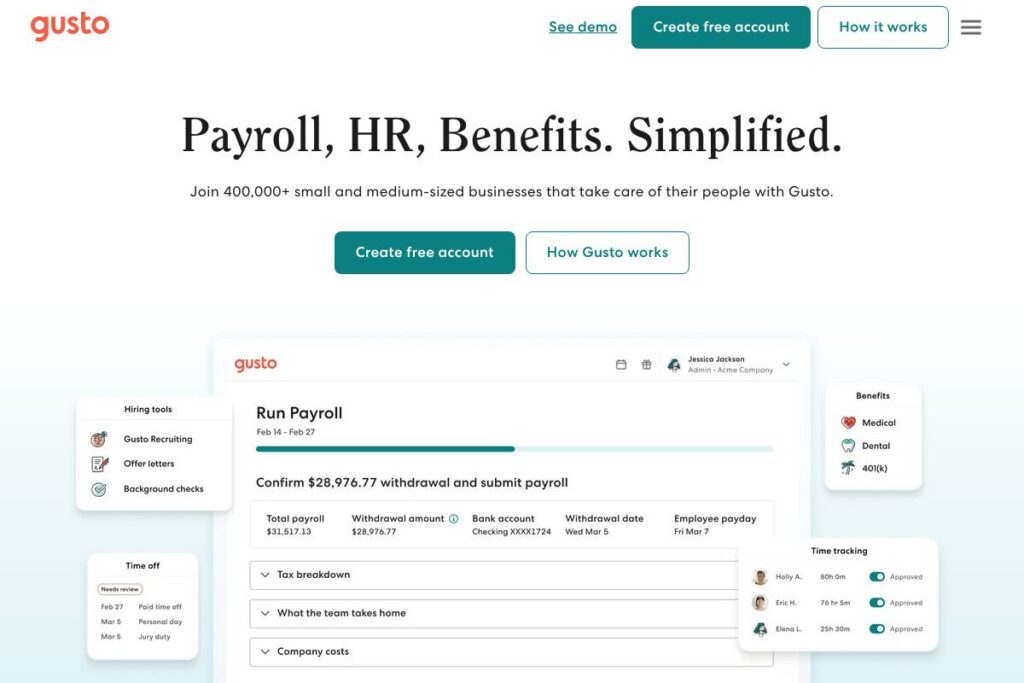

Gusto: An Overview
Gusto is a cloud-based HR platform that combines payroll processing, benefits administration, and core HR tools into a single service aimed at small and medium-sized businesses. It automates payroll tax filing, supports employee self-onboarding, and provides benefits brokerage and administration to help teams manage health insurance, 401(k), and other offerings.
Compared with larger payroll providers, Gusto focuses on ease of use and bundled HR features. ADP targets a wider range of company sizes and often uses custom enterprise pricing and integration services, while Paychex emphasizes payroll scale and professional employer organization services. For small teams that need a straightforward, all-in-one payroll and benefits solution, Gusto balances functionality with a simple setup and user-friendly interface.
All of this makes Gusto well suited for small businesses, startups, and people-operations teams that want to reduce manual payroll work and offer competitive benefits without managing multiple vendors. Its strong onboarding and benefits support make it a practical choice for companies that need payroll plus HR basics under one vendor.
How Gusto Works
Gusto handles payroll end to end by collecting employee pay and tax information, calculating withholdings, and submitting payroll tax filings to federal and state agencies automatically. Employers enter company and worker details once, and subsequent payroll runs reuse stored data to reduce repetitive work.
For benefits, Gusto acts as a broker and platform, helping businesses compare plans, enroll employees, and automate premium deductions alongside payroll. The platform also includes self-onboarding, electronic signatures for tax forms, and employee portals so workers can manage their direct deposit, tax documents, and benefits enrollment.
Operational workflows typically start with account setup and company profile creation, followed by employee import or self-onboarding. After that, teams run payroll on their chosen cadence, review tax filings and reports, and manage benefits and time off through the same interface.
Gusto features
Gusto is organized around payroll, benefits, and HR administration. Core capabilities include automated payroll and tax filing, benefits brokerage and administration, employee self-onboarding, time-off and time-tracking features, compliance tools, and integrations with accounting and productivity apps. The platform continues to expand employer-facing HR features to reduce manual administrative work.
Payroll processing
Automated payroll runs calculate gross pay, withholdings, and employer taxes, then issue direct deposits and/or pay stubs. The system files federal, state, and local payroll taxes automatically where supported, reducing manual tax paperwork and the risk of missed filings.
Tax filing and compliance
Gusto files payroll taxes and generates the necessary year-end forms, such as W-2s and 1099s, and provides guidance on payroll tax requirements. The platform also issues notifications and reminders for compliance tasks to keep small employers aligned with reporting deadlines.
Benefits administration
Gusto supports health insurance, dental, vision, and retirement plans by acting as a broker and administrator, managing enrollments, deductions, and carrier communications. Licensed advisors can assist in selecting plans and moving existing coverage onto the platform to centralize payroll and benefits deductions.
Employee onboarding and HR tools
New hires can self-onboard by entering personal and tax information, completing employment forms, and setting up direct deposit, which reduces HR manual entry. The platform stores employee documents, offers basic time-off policies, and supports custom pay schedules and wage types.
Time tracking and PTO management
Built-in time tracking and PTO tools let employees submit hours and request time off, while managers approve and sync those entries with payroll. These features help prevent mismatches between hours worked and payroll runs, and they support accrual policies and reporting.
Integrations and accounting sync
Gusto integrates with major accounting and productivity platforms to synchronize payroll and benefits data, reducing duplicate data entry for finance teams. Typical integrations include payroll sync to accounting ledgers and connectors that push payroll journals to your bookkeeping system.
With payroll, benefits, and onboarding all in one place, Gusto’s biggest benefit is reducing administrative overhead for small HR and finance teams so they can focus on people management rather than repetitive payroll tasks.
Gusto pricing
Gusto offers flexible subscription pricing tailored to business size and needs, with different plans and add-ons for payroll, benefits, and HR functionality. Because Gusto does not publish a single dedicated pricing page in all regions, the best way to get exact plan and rate information is to check the company directly.
For current plan options and to understand how pricing varies by business size and services chosen, visit Gusto’s homepage and explore their signup flow or contact sales for a tailored quote.
What is Gusto Used For?
Gusto is used primarily to run payroll and automate payroll tax filing for small and medium-sized businesses. Employers use it to pay employees and contractors, generate pay stubs, and handle W-2 and 1099 reporting without manual tax form submission.
Beyond payroll, Gusto is used to administer employee benefits and simplify onboarding. Teams leverage the platform to enroll employees in health and retirement plans, manage premium deductions, and provide a consistent onboarding workflow that collects tax documents and direct deposit information.
Pros and cons of Gusto
Pros
- Simple payroll setup and automation: Payroll is easy to configure, supports recurring pay schedules, and automates many tax filings to reduce administrative time. This helps small teams move from manual spreadsheets to automated payroll runs.
- Integrated benefits and brokerage: Gusto combines benefits administration with payroll, allowing employers to manage health insurance and retirement deductions in one place. Licensed advisors help with plan selection and carrier coordination.
- Employee self-service and onboarding: New hires complete tax forms and direct deposit via self-onboarding, freeing HR staff from data entry and reducing onboarding friction.
- Clear user interface and helpful support resources: The platform emphasizes a user-friendly UI and provides searchable help articles and tutorials for common payroll and benefits tasks.
Cons
- Limited enterprise-level features: For very large organizations or those needing deep customization and advanced HRIS capabilities, Gusto may lack the breadth of features offered by enterprise HR platforms. Organizations with complex global payroll needs may require a different vendor.
- Regional availability and carrier limitations: Health insurance options and certain benefits are regionally constrained, so plan availability varies by location and employer size. Employers should confirm provider availability for their region.
- Advanced reporting limitations: While reporting covers most small-business needs, companies that require highly customized or granular HR analytics may find reporting capabilities limited compared with dedicated HR analytics tools.
Does Gusto Offer a Free Trial?
Gusto offers a free account setup and does not charge until you are ready to run payroll. You can create an account, add company and employee details, and explore the platform before committing to a paid payroll run, which helps you test onboarding and setup without immediate cost.
Gusto API and Integrations
Gusto provides developer resources and an API for automating common workflows and integrating payroll data with accounting systems; see the Gusto API documentation for available endpoints and developer guides. The API supports employee and payroll data synchronization, making it possible to build custom integrations or automate data flows to other systems.
For non-developer integrations, Gusto connects with common accounting and productivity tools to synchronize payroll journals and employee data. Examples include payroll syncing to major accounting platforms and connectors that tie benefits and HR records into finance workflows.
10 Gusto alternatives
Paid alternatives to Gusto
- ADP — Large payroll and HR provider with scalable services for small to enterprise customers, strong compliance support, and a wide partner network. Good fit for companies that need global payroll options and dedicated account services.
- Paychex — End-to-end payroll and HR services with options for PEO arrangements and a focus on compliance and benefits administration for growing employers. Offers hands-on support and payroll services tailored to local requirements.
- Rippling — Combines payroll with a device and IT management platform, offering deep automation and centralized onboarding for teams that want integrated HR and IT workflows. Strong for companies that need workforce device provisioning alongside payroll.
- Paylocity — Offers payroll, HR, and talent management tools with an emphasis on mid-market clients and detailed reporting capabilities. Known for a robust HR feature set and employee engagement tools.
- BambooHR — Primarily an HRIS with basic payroll integrations, focused on HR workflows, applicant tracking, and employee records, best for organizations prioritizing HR functionality over payroll complexity.
- QuickBooks Payroll — Tightly integrated with QuickBooks accounting, offering payroll processing and tax filing for small businesses that already use QuickBooks for bookkeeping. Simplifies reconciliation for accounting teams.
- TriNet — Professional employer organization that provides payroll, benefits, and HR outsourcing, suitable for businesses that want a bundled PEO solution and access to enterprise-grade benefits.
Open source alternatives to Gusto
- Odoo — Open source ERP with HR and payroll modules, offering modular apps for employee management, payroll, and accounting. Useful for organizations that can self-host and customize workflows.
- OrangeHRM — Open source human resource management system focused on HR processes such as personnel information management, leave, and performance; payroll modules may require additional setup or modules.
- ERPNext — Open source ERP that includes HR and payroll functionality, suited for teams comfortable with self-hosting and customizing an integrated business management system.
- Sentrifugo — Open source HRMS with core HR features like performance management and employee records; organizations may need to extend it for full payroll compliance depending on region.
Frequently asked questions about Gusto
What payroll features does Gusto include?
Gusto includes automated payroll runs, tax filing, direct deposit, and year-end forms such as W-2s and 1099s. It also supports contractor payments and basic payroll reporting to help small businesses stay compliant.
Does Gusto provide benefits administration?
Yes, Gusto provides benefits brokerage and administration. Employers can enroll employees in health insurance, dental, vision, and retirement plans through the platform and manage premium deductions alongside payroll.
Can Gusto integrate with my accounting software?
Yes, Gusto supports integrations and syncs payroll data to popular accounting systems. The platform offers built-in connectors and an API for automating payroll journal entries and reconciliation.
Is Gusto suitable for small businesses?
Gusto is well suited for small and medium-sized businesses that need easy-to-use payroll and benefits tools. Its onboarding, self-service features, and benefits support are tailored to companies without large HR departments.
Does Gusto offer developer APIs?
Yes, Gusto offers API access for developers. The Gusto API documentation describes available endpoints for employee, payroll, and company data integration.
Final verdict: Gusto
Gusto does payroll, benefits administration, and lightweight HR in a way that reduces administrative overhead for small teams and startups. Its straightforward interface, employee self-onboarding, and combined benefits brokerage make it a practical choice for companies that want to consolidate payroll and benefits with minimal vendor management.
Compared with ADP, which often uses custom pricing and is designed to scale across mid-market and enterprise needs, Gusto is generally more approachable and cost-effective for small businesses that need bundled payroll and benefits without heavy customization. For teams that require enterprise-grade global payroll, more advanced HRIS features, or deeper analytics, ADP or a dedicated HR platform may be a better fit, but Gusto remains a strong option for organizations prioritizing simplicity and a unified payroll-benefits workflow.
If you want to explore features and set up an account, start with Gusto’s homepage or browse their help center and product demo to evaluate how the platform will integrate with your workflows.