Mailchimp: An Overview
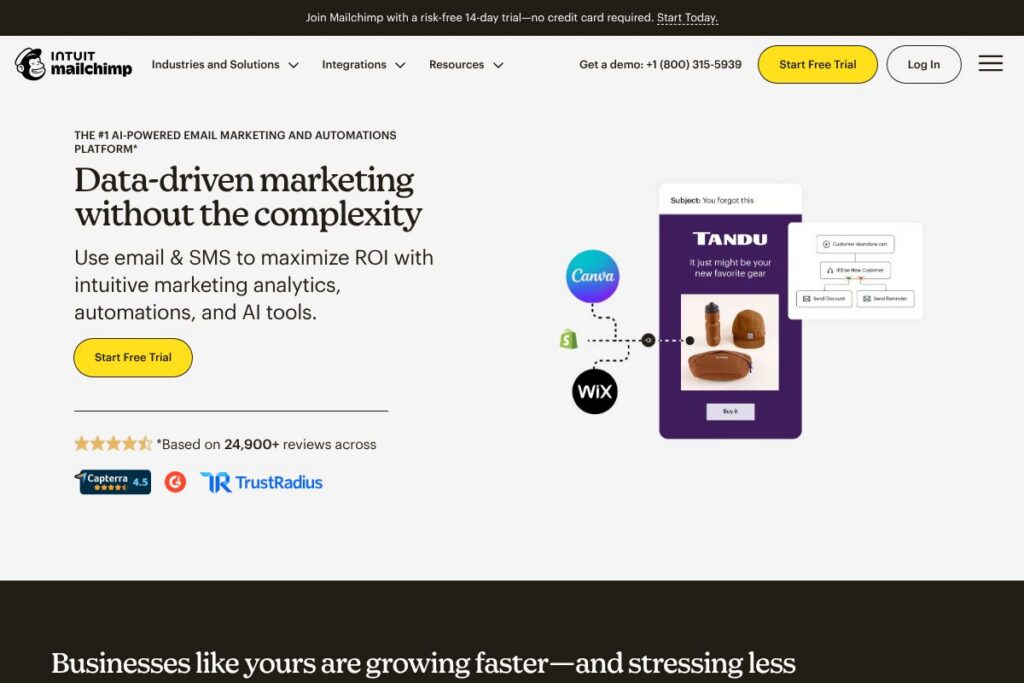
Mailchimp is a combined email and SMS marketing platform that focuses on audience management, automated campaigns, and data-driven insights. It provides templates and a visual builder for campaign creation, automated customer journeys, and analytics that tie campaign activity back to conversions for e-commerce and service businesses.
Mailchimp competes with tools such as Klaviyo, ActiveCampaign, and Constant Contact. Compared with Klaviyo, Mailchimp has a broader set of built-in templates and a lower-cost entry point for smaller lists, while Klaviyo emphasizes deeper e-commerce segmentation and revenue attribution. Against ActiveCampaign, Mailchimp offers a simpler user interface and more out-of-the-box integrations, while ActiveCampaign focuses on complex automation logic and CRM-style workflows.
All of this makes Mailchimp well suited for small businesses, e-commerce merchants, and marketing teams that want a single platform for email, SMS, and basic automation. It is especially useful where ease of setup, a wide range of integrations, and AI-assisted content generation are priority requirements.
How Mailchimp Works
Mailchimp centralizes contact data into audiences and segments, then uses templates, a drag-and-drop editor, or custom-coded templates to build messages for email and SMS. You can trigger automated flows based on events such as signups, purchases, or inactivity and combine email plus SMS steps in the same journey.
Campaigns can include A/B tests, multivariate tests on subject lines and content blocks, and conditional content that adapts to subscriber attributes. For e-commerce, Mailchimp connects to stores and reports revenue attributed to campaigns so teams can measure ROI and optimize based on real customer behaviors.
Mailchimp also surfaces AI-generated subject lines and copy suggestions, and provides reporting dashboards that show deliverability, open and click rates, and conversion metrics to guide follow-up actions.
Mailchimp features
Mailchimp organizes core capabilities around message creation, automation flows, audience segmentation, and analytics. Recent emphasis has been on generative AI to accelerate content creation, enhanced automation building, and expanded SMS capabilities as an add-on.
Generative AI and content tools
AI tools help generate subject lines, email copy, and content variations from a few prompts, reducing the time needed to assemble campaigns. These features are built to align with your audience data and tone preferences and can speed up campaign production for small teams.
Automated customer journeys
Visual workflow builders let you map multi-step journeys that include emails, SMS, and conditional branching based on behavior or purchase history. Automation templates simplify common flows such as abandoned cart recovery, welcome sequences, and re-engagement campaigns.
Audience segmentation and predictive segmentation
Segmentation tools allow filtering by activity, purchase history, and custom attributes, while predictive segmentation uses modeled signals to identify high-value or at-risk groups. That makes targeting more precise without manual rule-setting for each campaign.
Email and SMS campaign editor
A drag-and-drop email builder and responsive templates make message creation accessible to non-designers, while custom-coded templates are supported for advanced layouts. SMS can be added to campaigns as credits-based messaging in supported countries for time-sensitive, short-form communications.
Deliverability and transactional email
Mailchimp provides infrastructure for high deliverability, including support for transactional messages with high uptime and delivery rates. Transactional email capabilities are intended for order confirmations, password resets, and other programmatic messages.
Analytics and attribution
Built-in campaign analytics track opens, clicks, bounces, and revenue when connected to e-commerce platforms. Reports include conversion attribution so teams can evaluate which campaigns contribute to sales and adjust budgets accordingly.
Integrations and marketplace
Mailchimp connects to many e-commerce, CRM, and web platforms through native integrations and third-party connectors. The platform emphasizes an ecosystem of apps to extend forms, landing pages, and commerce data syncing across systems.
With these features, Mailchimp helps teams create consistent cross-channel campaigns, combine email and SMS steps in automation, and use audience signals plus AI suggestions to improve message relevance.
Mailchimp pricing
Mailchimp uses a subscription model with tiered plans that scale by feature set and contact volume. Plans range from a free tier for basic use up to enterprise-level tiers with personalized onboarding and priority support; trials and contact-volume discounts are sometimes available.
Monthly Billing:
Free – includes basic email campaigns, audience management, and limited automation features for small lists.
Essentials – adds expanded templates, A/B testing, and increased sending limits for growing teams.
Standard – includes advanced automations, predictive segmentation, SMS add-ons, and onboarding benefits such as a 14-day trial for new Standard customers.
Premium – designed for large lists and high-volume senders with advanced segmentation, multivariate testing, and priority phone support.
Annual Billing:
Free – same capabilities, no cost for qualifying small accounts.
Essentials – billed annually with higher contact tiers and usage allowances compared with monthly billing.
Standard – billed annually and often promoted with introductory discounts or credits for large contact imports; some promotions provide percent-off discounts for customers with 10,000+ contacts.
Premium – billed annually for enterprise-scale needs, and includes dedicated onboarding and priority support options during initial setup.
For the latest plan limits, trial details, and any promotional discounts, see Mailchimp’s plans and pricing for current options and terms.
What is Mailchimp Used For?
Mailchimp is commonly used for building and sending marketing emails, transactional messages, and SMS campaigns, with automation flows that support customer lifecycle marketing. Teams use it for welcome sequences, cart recovery, post-purchase follow-ups, and audience reactivation.
It is also used to collect leads via customizable signup forms and popups, to segment customers for targeted messaging, and to measure campaign performance in revenue terms when connected to e-commerce platforms. Small businesses and marketing teams that need a combined email and SMS solution find Mailchimp useful for running end-to-end campaigns without multiple vendors.
Pros and Cons of Mailchimp
Pros
- Wide integration ecosystem: Mailchimp connects to many e-commerce platforms, CRMs, and site builders, making it straightforward to pull in customer data and attribute revenue. This simplifies campaign setup and tracking across common commerce stacks.
- Accessible campaign builder and templates: The visual editor and starter templates reduce the time needed to create professional-looking emails, which benefits teams without dedicated design resources. Built-in A/B testing supports iterative improvement.
- Generative AI and automation: AI-assisted subject lines and copy suggestions speed content creation, while prebuilt automation templates help teams launch common workflows quickly. Predictive segmentation improves targeting for campaigns.
- Free tier and trials: A free option plus periodic trial windows for paid plans lower the barrier to testing the platform and validating ROI before committing to a paid subscription.
Cons
- Advanced features gated by higher tiers: Some advanced automation flows, predictive tools, and SMS/MMS capabilities require Standard or Premium plans, which can increase costs as contact lists grow. This can require careful planning around which features are essential.
- SMS availability and complexity: SMS is an add-on in supported countries and requires approval and credit purchasing; delivery and pricing vary by country which adds setup steps for international teams.
- Reporting depth for enterprise analytics: While Mailchimp offers solid campaign analytics, very large enterprises or teams needing deep custom attribution and BI-level reports may find the native reporting less flexible than dedicated analytics platforms.
Does Mailchimp Offer a Free Trial?
Mailchimp offers a free plan and a 14-day free trial for the Standard plan. The free plan provides basic email sending, templates, and audience management, while the Standard trial grants temporary access to advanced automations, predictive segmentation, and AI features for evaluation before upgrading.
Mailchimp API and Integrations
Mailchimp provides a developer API for managing audiences, campaigns, templates, and reports. The API documentation includes endpoints for creating and sending campaigns, managing contacts, and retrieving analytics.
The platform supports hundreds of integrations, including popular e-commerce connectors, CRM plugins, and marketing apps to sync contacts, events, and purchase data across systems. Common integrations include major commerce platforms, Zapier for automation, and native connectors for landing pages and form tools.
10 Mailchimp alternatives
Paid alternatives to Mailchimp
Klaviyo – Focused on e-commerce revenue attribution and advanced segmentation for stores that need deep lifecycle orchestration.
ActiveCampaign – Strong automation and CRM capabilities with robust conditional workflows and lead scoring for B2B and service businesses.
Constant Contact – Simple email marketing with event marketing features and small business-friendly templates.
Sendinblue – Email and SMS combined with transactional messaging and a pay-as-you-go sending model for varied volume needs.
HubSpot Marketing Hub – Integrated marketing suite with CRM, landing pages, and marketing automation designed for inbound teams.
Campaign Monitor – Template-focused email design with a visual builder and straightforward campaign reporting.
GetResponse – All-in-one marketing platform that includes webinar hosting, landing pages, and automation workflows.
Open source alternatives to Mailchimp
Mautic – Open source marketing automation that supports email campaigns, segmentation, and self-hosted workflows for teams that want full control.
Mailtrain – Self-hosted newsletter application with list management and campaign scheduling for developers who prefer hosting their own infrastructure.
Listmonk – High-performance self-hosted newsletter and mailing list manager suitable for teams that want a lightweight, open source option.
Postal – Open source mail server for transactional and bulk email sending, used by teams managing their own sending infrastructure.
Frequently asked questions about Mailchimp
What is Mailchimp used for?
Mailchimp is used for email and SMS marketing, automation, and audience management. It helps teams send campaigns, set up automated journeys, and measure campaign performance tied to conversions.
Does Mailchimp offer API access?
Yes, Mailchimp provides a REST API for developers. The API documentation describes endpoints for campaigns, audiences, templates, and reporting.
How much does Mailchimp cost for growing lists?
Mailchimp uses tiered subscription plans that scale by feature set and contact volume. Plans include a free tier plus Essentials, Standard, and Premium levels; contact-volume pricing and discounts for annual billing are available through the plans page.
Can Mailchimp send SMS messages?
Yes, Mailchimp supports SMS as an add-on for paid plans in select countries. SMS requires approval, purchase of credits, and is subject to regional delivery rules and pricing differences.
Is Mailchimp suitable for e-commerce stores?
Yes, Mailchimp is commonly used by e-commerce merchants. Integrations with stores and revenue attribution reporting let teams tie campaigns to purchases and calculate ROI.
Final Verdict: Mailchimp
Mailchimp is a practical choice for businesses that need a combined email and SMS platform with accessible campaign creation, a broad integration ecosystem, and AI tools that reduce content production time. Its free tier and trial options make it a low-risk way to evaluate whether the platform fits an organizations needs.
Compared with Klaviyo, Mailchimp generally provides a lower-cost entry point and a wider set of built-in templates and integrations, while Klaviyo often delivers deeper e-commerce segmentation and revenue-focused features at a higher cost. For teams prioritizing ease of use and an all-in-one solution, Mailchimp is a strong candidate; teams requiring enterprise-grade attribution or very advanced automation logic may evaluate Klaviyo or ActiveCampaign alongside it.